
How to Use ChatGPT for Network Marketing
Learn how ChatGPT can help you create content, organize ideas, prepare follow-ups and work more efficiently—while keeping the human side of your network marketing business at the center.
Introduction
Artificial Intelligence अब केवल technology experts के लिए नहीं रह गया है। पिछले कुछ वर्षों में AI tools ने digital work को काफी accessible बना दिया है। आज एक सामान्य digital user भी AI की मदद से ideas generate कर सकता है, content तैयार कर सकता है, information organize कर सकता है और अपने daily workflow को अधिक efficient बना सकता है।
खास बात यह है कि AI का उपयोग करने के लिए आपको programmer या technology expert होने की जरूरत नहीं है। आप सामान्य भाषा में अपनी आवश्यकता बता सकते हैं और AI उसी आधार पर suggestions, drafts, outlines और ideas तैयार करने में आपकी मदद कर सकता है।
Network marketers के लिए यह capability विशेष रूप से useful हो सकती है क्योंकि उनके daily work में कई ऐसी activities होती हैं जिन्हें बार-बार करना पड़ता है। उदाहरण के लिए content ideas सोचना, social media posts लिखना, captions तैयार करना, follow-up messages draft करना, Reel scripts बनाना, FAQs तैयार करना और एक ही idea को अलग-अलग content formats में बदलना।
इन activities में creativity के साथ-साथ काफी समय भी लगता है। कई बार समस्या यह नहीं होती कि आपके पास कोई idea नहीं है, बल्कि समस्या यह होती है कि उस idea को सही words, structure और format में कैसे प्रस्तुत किया जाए।
यहीं पर ChatGPT एक practical AI assistant की तरह काम कर सकता है। यह आपके लिए initial ideas दे सकता है, rough drafts तैयार कर सकता है, content को अलग-अलग formats में बदल सकता है और किसी topic को सरल भाषा में समझाने में सहायता कर सकता है।
लेकिन शुरुआत में एक बात बिल्कुल clear होना जरूरी है। AI का इस्तेमाल करने का मतलब यह नहीं है कि आपको अपने business की human side को कम करना है।
आपकी experience, personality, judgement और relationships ही आपके business की वास्तविक human value हैं। ChatGPT इन qualities को replace नहीं करता। यह केवल आपके काम के कुछ हिस्सों को faster, organized और easier बनाने में आपकी सहायता कर सकता है।
इसलिए इस पूरे guide को एक simple principle के साथ समझना useful होगा: AI आपके काम को बेहतर बनाने का माध्यम है, आपके काम की जिम्मेदारी लेने वाला व्यक्ति नहीं।

1. ChatGPT क्या है और Network Marketers के लिए क्यों Useful है?
ChatGPT एक conversational AI tool है जिसके साथ आप natural language में बातचीत कर सकते हैं। आप इसे कोई question पूछ सकते हैं, किसी topic पर ideas मांग सकते हैं, किसी draft को improve करने के लिए कह सकते हैं या किसी complex information को simple language में समझाने के लिए कह सकते हैं।
एक beginner के लिए इसे complicated technology की तरह समझने की जरूरत नहीं है। शुरुआत में आपको केवल यह समझना है कि ChatGPT को सही direction देने पर यह आपके लिए एक intelligent working assistant की तरह कई tasks में सहायता कर सकता है।
अगर आप ChatGPT के अलावा network marketing में उपयोगी दूसरे AI tools के बारे में भी जानना चाहते हैं, तो हमारी practical guide AI Tools for Network Marketers: Save Time, Work Smarter & Grow Faster भी देखें।
उदाहरण के लिए, अगर आपको अपने audience के लिए एक social media post बनानी है, तो आपको केवल इतना लिखने के बजाय कि “एक post लिखो”, आप ChatGPT को topic, audience, tone, objective और desired format के बारे में context दे सकते हैं। जितनी clear direction होगी, उतना useful initial output मिलने की संभावना बढ़ेगी।
इसी तरह यदि आपको किसी prospect के साथ follow-up करना है, तो ChatGPT आपको एक respectful और natural message का draft तैयार करने में मदद कर सकता है। लेकिन final message भेजने से पहले आपको उसे उस व्यक्ति और आपकी वास्तविक conversation के अनुसार personalize करना चाहिए।
इसे एक Simple Workflow की तरह समझिए
ChatGPT का सबसे practical उपयोग तब होता है जब आप उसे अपने decision-making process का replacement न बनाकर workflow का हिस्सा बनाते हैं।
आप → Direction और Context देते हैं
ChatGPT → Ideas, Suggestions और Draft देता है
आप → Output को Review करते हैं
आप → अपने Experience और Personality के अनुसार Personalize करते हैं
आप → Final Decision लेते हैं
इस workflow में सबसे important बात यह है कि final control आपके पास रहता है। AI आपको possibilities दिखा सकता है, लेकिन आपके business के context को समझकर सही decision लेना आपकी responsibility है।
यही approach आपको AI का responsible और practical user बनाती है। आप हर output को blindly copy करने के बजाय उसे एक starting point की तरह देखते हैं और फिर अपनी understanding के आधार पर उसे बेहतर बनाते हैं।
Network Marketing में इसके Practical Uses
Network marketing के daily workflow में ChatGPT का उपयोग कई छोटे लेकिन useful tasks के लिए किया जा सकता है। इसका उद्देश्य आपके relationships को automate करना नहीं, बल्कि उन activities में आपकी सहायता करना है जिनमें planning, drafting या organization की जरूरत होती है।
- Content ideas generate करने में
- Social media posts के drafts तैयार करने में
- Captions और post variations बनाने में
- Reel hooks और short-video ideas तैयार करने में
- Video scripts की basic structure बनाने में
- Follow-up messages के initial drafts तैयार करने में
- Frequently Asked Questions यानी FAQs organize करने में
- पुराने content को नए formats में repurpose करने में
- Daily tasks और content planning organize करने में
- नए ideas पर brainstorming करने में
इन Uses को Practical Examples से समझिए
अगर आपको लगातार social media content बनाना है, तो ChatGPT आपके topic के आधार पर multiple content ideas suggest कर सकता है। इससे blank page से शुरुआत करने की परेशानी कम हो सकती है।
किसी एक idea को informative post, short caption, educational post या conversational format में बदलने के लिए ChatGPT initial drafts तैयार कर सकता है। इसके बाद आप अपनी language और personal experience जोड़ सकते हैं।
Short-form video के लिए hook, main points और closing structure तैयार करने में AI useful हो सकता है। इससे आपको video बनाने से पहले एक clear structure मिल सकता है।
Follow-up communication में सही tone बहुत important होती है। ChatGPT आपको polite और conversational draft बनाने में मदद कर सकता है, लेकिन final message को सामने वाले व्यक्ति के साथ आपकी वास्तविक बातचीत के अनुसार personalize करना चाहिए।
एक long-form idea को short post, caption, Reel outline, FAQ या checklist जैसे formats में बदलने में ChatGPT आपका काफी समय बचा सकता है। इससे एक useful idea से कई content assets तैयार किए जा सकते हैं।
यदि आपके पास कई content ideas हैं लेकिन उन्हें organize करना मुश्किल हो रहा है, तो ChatGPT उन ideas को categories, themes या weekly content plans में arrange करने में सहायता कर सकता है।
लेकिन हर AI output को बिना सोचे इस्तेमाल करना सही approach नहीं है। AI से output लेना पहला step है; उसे review करना, facts को verify करना, अपने experience के अनुसार personalize करना और final decision लेना आपका काम है।
खासकर network marketing में communication केवल words का खेल नहीं है। आपके सामने एक वास्तविक व्यक्ति होता है जिसके साथ trust और relationship build करनी होती है। इसलिए AI-generated message को mechanical या overly generic बनाने के बजाय अपनी natural voice में adapt करना ज्यादा effective approach है।
इसी तरह AI से मिलने वाली information को भी context के अनुसार समझना जरूरी है। यदि कोई information business decision, product information, company policy या किसी महत्वपूर्ण claim से जुड़ी है, तो appropriate source से उसे verify करना एक responsible practice है।
इस तरह ChatGPT को एक shortcut की तरह नहीं, बल्कि एक productivity assistant की तरह इस्तेमाल किया जा सकता है। आप जितना बेहतर context देंगे, जितना carefully output review करेंगे और जितना ज्यादा अपनी human experience उसमें जोड़ेंगे, उतना ही practical इसका उपयोग आपके daily workflow में हो सकता है।
आगे हम देखेंगे कि ChatGPT से बेहतर output प्राप्त करने के लिए सही prompt कैसे लिखें और एक beginner किस तरह simple prompting techniques का उपयोग करके अपने daily network marketing tasks को अधिक effectively handle कर सकता है।
2. ChatGPT क्या कर सकता है — और क्या नहीं?
AI को effectively इस्तेमाल करने के लिए केवल यह जानना काफी नहीं है कि ChatGPT क्या कर सकता है। यह समझना भी उतना ही जरूरी है कि इसकी limitations क्या हैं। जब आप capabilities और limitations दोनों को समझते हैं, तब आप AI को ज्यादा practical, responsible और useful तरीके से अपने workflow में शामिल कर सकते हैं।
ChatGPT को एक ऐसा assistant समझना बेहतर है जो आपके ideas को organize करने, drafts तैयार करने, possibilities explore करने और information को एक useful structure में बदलने में आपकी मदद कर सकता है। लेकिन इसका मतलब यह नहीं है कि हर answer automatically आपके exact situation के लिए सही होगा।
इसलिए एक smart AI user बनने का पहला step है—AI की strengths को समझना और उसकी limitations को स्वीकार करना।
ChatGPT क्या कर सकता है?
ChatGPT के साथ आप natural language में अपनी जरूरत बता सकते हैं। अगर आपका instruction clear है और आपने पर्याप्त context दिया है, तो यह आपके लिए useful starting material तैयार कर सकता है।
उदाहरण के लिए आप उससे कह सकते हैं:
“मेरे audience के लिए 10 content ideas दो।”
“इस topic को beginner-friendly language में explain करो।”
“इस long article को एक short Reel script में बदलो।”
“इस message को ज्यादा friendly और conversational बनाओ।”
इन simple examples से एक important बात समझ आती है। ChatGPT केवल questions के answers देने के लिए useful नहीं है। यह आपके existing ideas को expand करने, simplify करने, restructure करने और अलग formats में convert करने में भी सहायता कर सकता है।
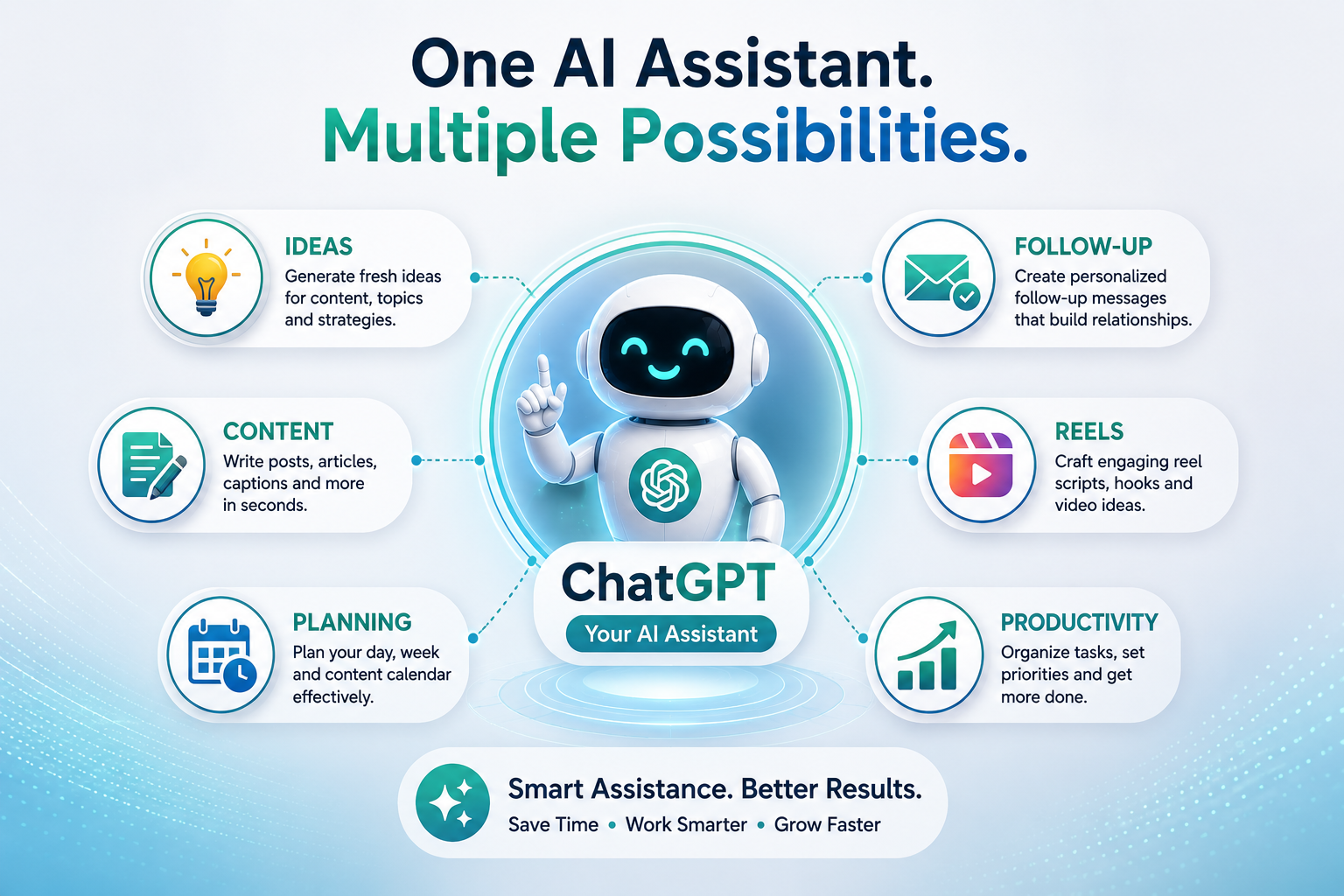
- Content ideas generate करने में
- Social media posts के initial drafts बनाने में
- Captions और hooks के variations तैयार करने में
- Long content को short-form content में बदलने में
- Reel या video script की basic structure बनाने में
- Follow-up message के draft तैयार करने में
- FAQs और common questions को organize करने में
- Brainstorming और idea generation में
- Content को अलग-अलग audience formats के लिए adapt करने में
- Daily content planning और task organization में
इसका सबसे बड़ा practical benefit यह है कि आपको हर बार blank page से शुरुआत नहीं करनी पड़ती। आप ChatGPT से initial possibilities ले सकते हैं और फिर उन possibilities में से अपने उद्देश्य के लिए सबसे useful direction चुन सकते हैं।
उदाहरण के लिए, यदि आपके पास किसी topic पर केवल एक basic idea है, तो आप ChatGPT से उसी idea के दस अलग angles मांग सकते हैं। फिर उनमें से वह angle चुन सकते हैं जो आपके audience के लिए सबसे relevant लगता है।
AI आपकी Thinking और Creation Process को कैसे Accelerate कर सकता है?
अगर आपको किसी topic पर post लिखनी है लेकिन शुरुआत समझ नहीं आ रही, तो ChatGPT outline या multiple ideas दे सकता है। इससे आपका creative process शुरू करना आसान हो जाता है।
एक long-form article को short post, caption, Reel idea, FAQ या checklist में बदलने के लिए ChatGPT useful starting drafts तैयार कर सकता है।
किसी message को ज्यादा clear, polite, friendly या conversational बनाने के लिए आप ChatGPT से alternative versions मांग सकते हैं।
कभी-कभी आपको किसी idea पर feedback या नए angles की जरूरत होती है। ChatGPT multiple possibilities देकर आपकी brainstorming process को आगे बढ़ा सकता है।
लेकिन ChatGPT क्या नहीं कर सकता?
यहीं पर responsible AI usage शुरू होता है। ChatGPT powerful assistant हो सकता है, लेकिन यह आपके business और relationships के हर context को automatically नहीं जानता।
यह आपके द्वारा दिए गए information और context के आधार पर response generate करता है। इसलिए अगर आपने जरूरी context नहीं दिया है, तो output generic, incomplete या आपकी वास्तविक situation से अलग हो सकता है।
- आपके prospect की वास्तविक situation क्या है
- आपके audience की exact emotional needs क्या हैं
- आपकी personal story और experiences क्या हैं
- आपके business में कौन-सा decision सही है
- किसी व्यक्ति के साथ आपका relationship कितना पुराना या sensitive है
- आपके सामने मौजूद real-world circumstances क्या हैं
उदाहरण के लिए, मान लीजिए कोई prospect आपके business opportunity के बारे में interested है लेकिन उसके साथ आपकी पहले से कई महीनों की conversation है। ChatGPT उस relationship की पूरी history automatically नहीं जान सकता जब तक आप relevant context उसे न दें।
इसी तरह यदि किसी व्यक्ति ने पहले किसी personal difficulty के बारे में आपसे बात की है, तो केवल एक generic follow-up template उस relationship की sensitivity को capture नहीं कर पाएगा।
यही कारण है कि AI-generated communication को copy-paste करने के बजाय उसे अपने actual conversation और relationship के अनुसार personalize करना जरूरी है।
Network marketing में यह distinction विशेष रूप से important है। किसी व्यक्ति के साथ trust केवल एक perfectly written message से नहीं बनता। Trust consistent communication, genuine interest, listening, understanding और real human connection से build होता है।
इसलिए ChatGPT को communication का final decision-maker बनाने के बजाय drafting partner की तरह इस्तेमाल करना ज्यादा practical है। आप उससे तीन या चार versions मांग सकते हैं, उनमें से एक select कर सकते हैं, फिर अपनी natural language और personal context जोड़ सकते हैं।
AI Output को Final Truth क्यों नहीं मानना चाहिए?
AI-generated response useful हो सकता है, लेकिन उसे automatically final truth मानना सही approach नहीं है। किसी भी important information को use करने से पहले उसका context, accuracy और relevance check करना जरूरी है।
विशेष रूप से product information, company policies, pricing, business claims या किसी महत्वपूर्ण factual statement से जुड़ी information के मामले में appropriate source से verification करना responsible practice है।
AI आपको एक strong starting point दे सकता है, लेकिन final quality आपकी review process पर depend करती है। यही difference है केवल AI इस्तेमाल करने और AI को effectively इस्तेमाल करने के बीच।
AI output को final truth नहीं, starting point समझिए। ChatGPT से ideas और drafts लीजिए, उन्हें critically review कीजिए, अपने experience और context के अनुसार personalize कीजिए और final decision खुद लीजिए।
अब जब आपको ChatGPT की capabilities और limitations दोनों समझ आ गई हैं, अगला practical step है यह सीखना कि ChatGPT को सही instruction कैसे दिया जाए। क्योंकि बेहतर context और clearer prompts अक्सर ज्यादा useful output की शुरुआत करते हैं।
3. ChatGPT के साथ Better Prompt कैसे लिखें?
ChatGPT से मिलने वाला output अक्सर इस बात पर depend करता है कि आपने उसे instruction कितनी clarity से दी है। जितना clear आपका direction होगा, उतना ही आसान ChatGPT के लिए आपकी जरूरत के अनुसार response तैयार करना होगा।
बहुत से beginners ChatGPT खोलकर सीधे एक छोटा सा instruction लिख देते हैं और फिर उम्मीद करते हैं कि AI उनकी पूरी situation समझ जाएगा। लेकिन AI को आपके business, audience, objective और context के बारे में वही information पता होती है जो आप उसे बताते हैं।
इसलिए effective prompting का पहला principle है: AI को guess करने के लिए मजबूर मत कीजिए। उसे relevant context दीजिए।
एक Vague Prompt कैसा दिखता है?
मान लीजिए आप ChatGPT से कहते हैं:
“Network marketing पर post लिखो।”
यह instruction गलत नहीं है, लेकिन काफी broad है। इसमें यह information नहीं है कि post किसके लिए है, उसका purpose क्या है, किस platform पर publish होगी, tone कैसी होनी चाहिए या किन चीजों से बचना है।
इसलिए ChatGPT एक generic post तैयार कर सकता है जो technically ठीक हो, लेकिन आपके specific audience और communication style के लिए उतना useful न हो।
Better Prompt में Context क्यों जरूरी है?
अब उसी request को थोड़ा context देकर देखिए। यदि आप AI को बताते हैं कि आपका audience कौन है, आपका goal क्या है और आपको किस format में content चाहिए, तो AI के पास response को shape करने के लिए ज्यादा useful direction होती है।
ROLE + AUDIENCE + GOAL + CONTEXT + FORMAT + TONE + CONSTRAINTS
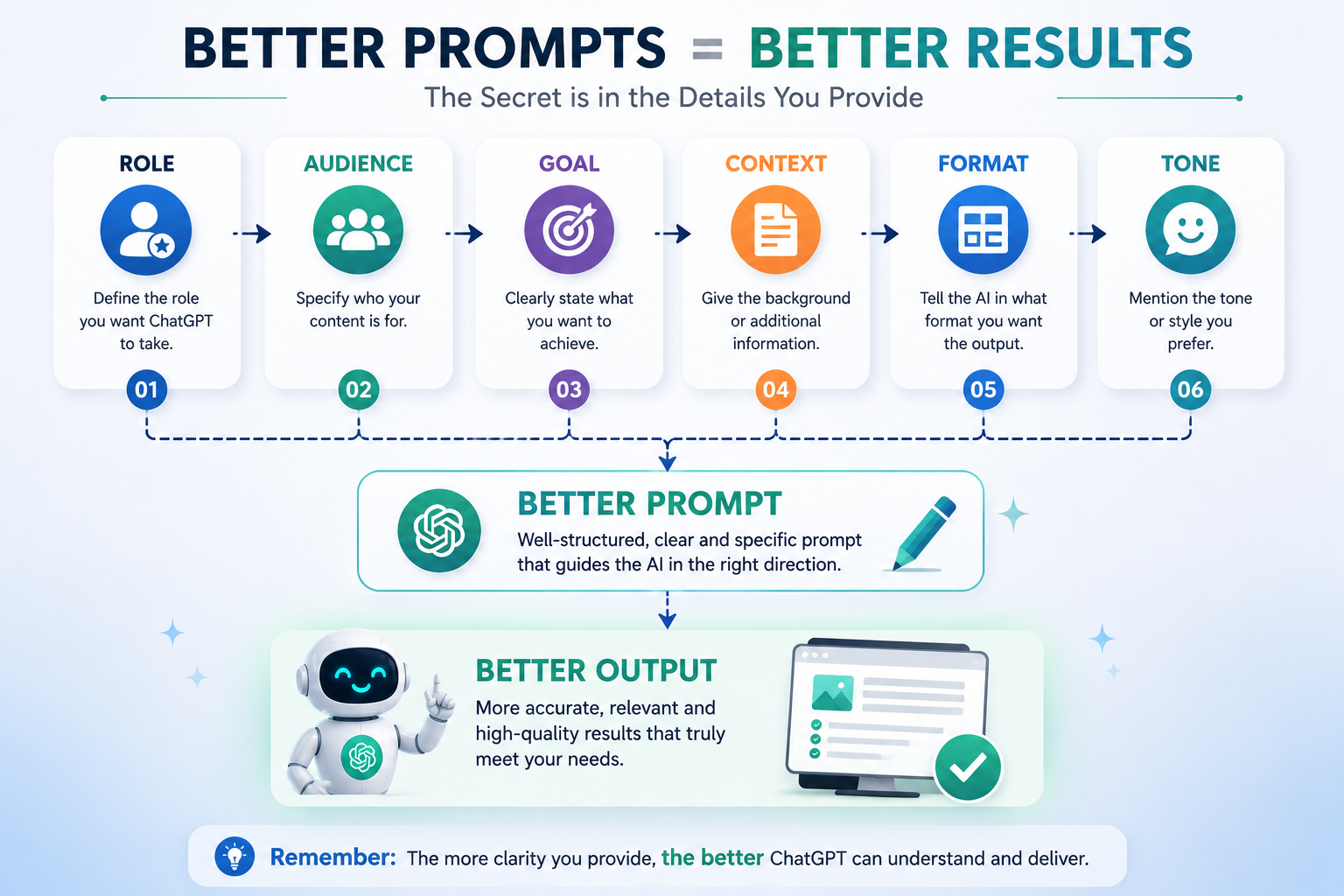
इस formula को याद रखने का सबसे आसान तरीका यह है कि prompt में केवल यह न बताएं कि आपको क्या चाहिए। यह भी बताएं कि किसके लिए चाहिए, क्यों चाहिए और कैसे चाहिए।
Better Prompt Formula के 7 Important Parts
AI को बताइए कि उसे किस perspective से काम करना है। उदाहरण: “Act as a content strategist.”
बताइए कि content किस audience के लिए है। जैसे beginner network marketers, existing customers या social media audience।
आपका objective क्या है, यह स्पष्ट कीजिए। Education, engagement, awareness, lead generation या relationship building—goal clear होने से direction बेहतर होती है।
जरूरी background information दीजिए। Topic, situation, previous conversation या relevant details जितने useful होंगे, response उतना context-aware हो सकता है।
Output किस form में चाहिए, यह बताइए—social media post, Reel script, email, WhatsApp message, checklist, comparison या outline।
Communication style define कीजिए। Friendly, educational, conversational, professional, encouraging या simple— tone बताने से output आपकी communication जरूरत के करीब आता है।
किन चीजों को include या avoid करना है, यह बताइए। उदाहरण के लिए word limit, simple language, no exaggerated claims, no aggressive sales language या one practical example।
एक Complete Better Prompt का Example
अब इन सभी elements को एक ही prompt में combine करके देखते हैं। यह approach beginners के लिए विशेष रूप से useful है क्योंकि इससे AI को task की complete direction मिल जाती है।
Act as a content strategist.
My audience is beginner network marketers.
Create an educational post about consistency.
Use one practical example.
Format it as a social media post.
Keep the tone friendly and encouraging.
Avoid exaggerated income claims.
इस prompt में AI को केवल topic नहीं बताया गया है। उसे role, audience, goal, content requirement, format, tone और limitation सभी दिए गए हैं। इसलिए उसके पास response तैयार करने के लिए काफी बेहतर direction है।
Network Marketing में Prompt को और Practical कैसे बनाएं?
Network marketing में context का importance और भी बढ़ जाता है। एक ही topic को अलग-अलग situations में बिल्कुल अलग तरीके से communicate करना पड़ सकता है।
उदाहरण के लिए “follow-up message लिखो” एक basic instruction है। लेकिन अगर आप बताते हैं कि सामने वाला व्यक्ति पहले product के बारे में interested था, उसने कुछ दिन पहले response नहीं दिया और आप उसे बिना pressure के follow-up करना चाहते हैं, तो AI को ज्यादा meaningful direction मिलती है।
इसी तरह “Reel script बनाओ” कहने के बजाय आप बता सकते हैं कि Reel beginners के लिए है, duration लगभग 30 seconds है, objective education है और tone conversational रखनी है।
Context जितना relevant और specific होगा, उतना ही कम आपको AI के output को बाद में completely rewrite करना पड़ेगा।
एक ही Prompt को Step-by-Step Improve करना सीखिए
Prompt writing को एक skill की तरह develop किया जा सकता है। आपको शुरुआत से ही perfect prompt लिखने की जरूरत नहीं है। एक simple instruction से शुरुआत करके धीरे-धीरे उसमें useful details add कीजिए।
- पहले अपना basic objective लिखिए।
- फिर audience और context जोड़िए।
- इसके बाद format और tone specify कीजिए।
- जरूरत हो तो examples या constraints add कीजिए।
- पहला output review करके prompt को और refine कीजिए।
उदाहरण के लिए, पहला prompt हो सकता है:
“Consistency पर post लिखो।”
इसके बाद आप इसे improve कर सकते हैं:
“Beginner network marketers के लिए consistency पर एक educational social media post लिखो। Tone friendly और encouraging रखो। एक practical example शामिल करो और exaggerated income claims avoid करो।”
अब prompt ज्यादा specific है। आपने AI को topic के साथ audience, purpose, format, tone और constraint भी दे दिया है।
अगर आप AI की मदद से social media content को faster और more systematically create करना चाहते हैं, तो हमारी practical guide How AI Can Help You Create Social Media Content Faster भी पढ़ें।
Beginners की Common Prompt Mistakes
- केवल एक या दो शब्दों का बहुत broad instruction देना।
- Audience के बारे में कोई context न देना।
- Desired format और tone स्पष्ट न करना।
- Important limitations या boundaries mention न करना।
- पहला output देखकर बिना review किए उसे publish कर देना।
- AI से अपने personal experience को replace करने की उम्मीद करना।
इनमें से सबसे common mistake है कि लोग prompt को search query की तरह लिखते हैं। ChatGPT के साथ आप conversation कर सकते हैं। इसलिए अगर पहला answer आपकी जरूरत के अनुसार नहीं है, तो वहीं follow-up instruction देकर उसे improve कराया जा सकता है।
पहला Output Perfect न हो तो क्या करें?
इसका मतलब यह नहीं है कि ChatGPT useful नहीं है। अक्सर बेहतर result पाने का तरीका एक ही prompt में सब कुछ perfect लिखना नहीं, बल्कि response को देखकर अगला instruction देना होता है।
आप कह सकते हैं: “इसे और simple बनाओ.” या “इसमें एक practical example जोड़ो.” या “Tone को ज्यादा conversational बनाओ.” या “इसे 150 words के अंदर रखो.”
इस तरह prompting एक one-time command नहीं बल्कि iterative conversation बन जाती है। आप direction देते हैं, output देखते हैं, feedback देते हैं और फिर response को refine करते हैं।
याद रखिए: Clear Input → Better Direction → Better Output
Better Output मिलने के बाद भी आपका काम खत्म नहीं होता
एक अच्छा AI response मिलने के बाद उसे blindly publish करना सही workflow नहीं है। AI ने draft तैयार करने में आपकी मदद की है; final communication अभी भी आपकी responsibility है।
खासकर network marketing जैसे relationship-driven field में language को अपने natural communication style के अनुसार personalize करना important है। आपके audience को आपकी आवाज, आपका experience और आपका genuine perspective महसूस होना चाहिए।
- Review — Output को ध्यान से पढ़िए।
- Edit — जरूरी corrections और improvements कीजिए।
- Personalize — अपना experience और natural voice जोड़िए।
- Verify — Important facts और claims check कीजिए।
- Publish — Final version को अपने judgement से approve कीजिए।
यही approach AI को एक simple content generator से एक practical working assistant में बदलती है। आप AI से speed और structure ले सकते हैं, लेकिन direction, judgement और final responsibility अपने पास रख सकते हैं।
अब जब आपने समझ लिया कि better prompts कैसे लिखे जाते हैं, अगला step है इन्हीं prompting principles को real network marketing situations में apply करना—जैसे content ideas, social media posts, Reel scripts और follow-up messages।
4. ChatGPT से Content Ideas कैसे निकालें?
Content creation का सबसे common challenge है: “आज क्या post करूँ?” जब आपको हर दिन zero से नया idea सोचना पड़ता है, तो consistency maintain करना difficult हो सकता है। खासकर तब, जब आप अपने business के साथ-साथ customers, prospects और daily activities भी manage कर रहे हों।
अच्छी बात यह है कि आपको हर दिन completely नया topic invent करने की जरूरत नहीं है। अक्सर आपके पास पहले से ही कई useful topics होते हैं, लेकिन उनके अलग-अलग content angles दिखाई नहीं देते।
यहीं पर ChatGPT एक practical brainstorming assistant की तरह काम कर सकता है। आप उसे एक broad topic दे सकते हैं और उससे उस topic के अलग-अलग perspectives, questions, examples और content ideas निकाल सकते हैं।
अगर आप AI की मदद से social media content को faster और more systematically create करना चाहते हैं, तो हमारी practical guide How AI Can Help You Create Social Media Content Faster भी पढ़ें।
Common Content Challenge
“आज क्या post करूँ?”
रोज zero से idea शुरू करना time लेने वाला और mentally exhausting हो सकता है। एक broad topic को multiple angles में बदलना इस problem को काफी आसान बना सकता है।
Content Ideas निकालना क्यों Important है?
Network marketing में consistency आपकी online visibility और audience के साथ ongoing communication के लिए important है। लेकिन consistency का मतलब यह नहीं है कि आपको हर दिन कुछ extraordinary create करना है।
इसका मतलब है कि आपके पास एक organized content pipeline हो, जिसमें अलग-अलग topics और formats पहले से available हों। इससे आप last-minute pressure के बजाय planned तरीके से content create कर सकते हैं।
ChatGPT इस process में आपकी brainstorming speed बढ़ा सकता है। यह आपको एक ही topic के कई possible angles दे सकता है, जिन्हें आप बाद में अपने audience, platform और objective के अनुसार select कर सकते हैं।
एक Broad Topic से Multiple Content Ideas कैसे निकालें?
मान लीजिए आपका broad topic है:
Personal Branding
अब आप ChatGPT को केवल “Personal branding पर content दो” कहने के बजाय एक clear instruction दे सकते हैं:
“Personal branding पर beginner network marketers के लिए 20 educational content ideas दो।”
अब AI को topic के साथ audience और content purpose भी पता है। इससे आपको random ideas के बजाय ज्यादा relevant starting possibilities मिल सकती हैं।
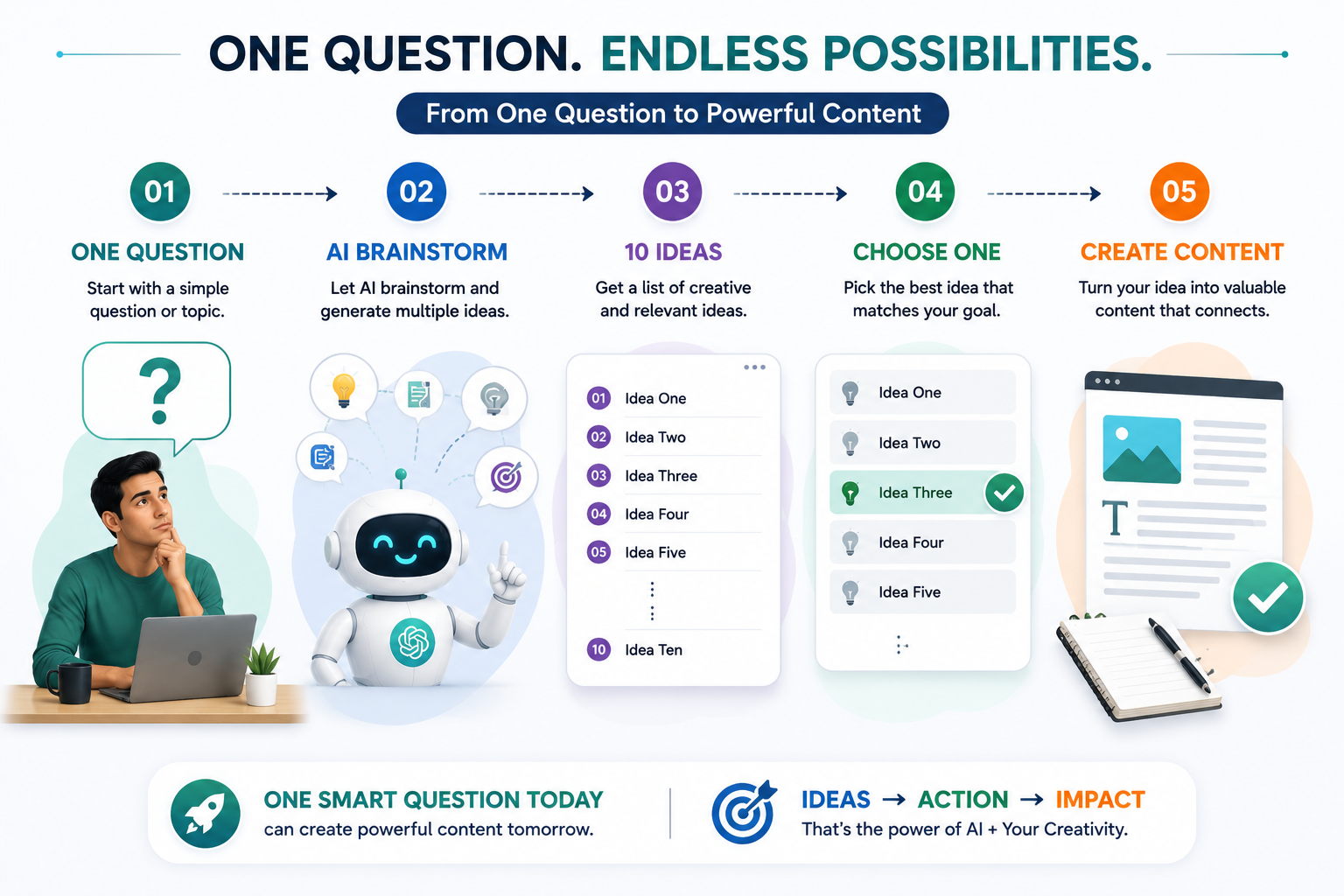
AI से ideas मिलने के बाद अगला important step है उन्हें organize करना। केवल 20 या 30 ideas की लंबी list होना पर्याप्त नहीं है। अगर आप उन्हें categories में divide करते हैं, तो content planning और execution दोनों ज्यादा आसान हो जाते हैं।
Ideas को Categories में बाँटने का Example
Personal branding जैसे broad topic को आप अलग-अलग content categories में divide कर सकते हैं। इससे एक ही subject पर लगातार content बनाते समय repetition कम होता है और audience को भी अलग-अलग types की value मिलती रहती है।
- Personal branding क्या है?
- Personal brand क्यों important है?
- Personal branding में beginners की common mistakes
- Network marketing में personal branding कैसे useful है?
- Strong personal brand बनाते समय क्या ध्यान रखें?
- अपना bio कैसे improve करें?
- Profile photo कैसी होनी चाहिए?
- Content topics कैसे चुनें?
- Daily content plan कैसे बनाएं?
- Personal brand के लिए social media profile कैसे optimize करें?
- मेरी personal branding journey
- मैंने consistency से क्या सीखा?
- मेरी शुरुआती challenges क्या थीं?
- मेरी पहली meaningful post से मैंने क्या सीखा?
- छोटे steps से brand बनाने का मेरा experience
ध्यान दीजिए कि broad topic अभी भी वही है—Personal Branding। लेकिन अब आपके पास उसी topic को explain, teach और experience के रूप में present करने के कई तरीके हैं।
Educational Content से Audience को Value दीजिए
Educational content का उद्देश्य audience को किसी concept को समझने में मदद करना होता है। Network marketing में beginners के लिए educational content विशेष रूप से useful हो सकता है क्योंकि वे अक्सर basic concepts को simple और practical तरीके से समझना चाहते हैं।
उदाहरण के लिए “Personal branding क्या है?” एक basic educational post हो सकती है। इसके बाद “Personal branding क्यों important है?” और “Beginners कौन-सी mistakes करते हैं?” जैसे follow-up topics naturally उसी content series का हिस्सा बन सकते हैं।
इस तरह ChatGPT से मिले एक broad idea को आप एक complete educational content series में बदल सकते हैं।
Practical Content से Ideas को Action में बदलिए
केवल theory explain करने के बजाय practical content audience को next step समझने में मदद करता है। इसलिए brainstorming करते समय ChatGPT से “how-to” और action-oriented ideas भी मांगना useful है।
Personal branding के example में आप bio improvement, profile optimization, content selection और daily planning जैसे topics पर practical posts बना सकते हैं।
ऐसे topics audience को केवल information नहीं देते, बल्कि उन्हें कुछ implement करने का clear direction भी देते हैं।
Storytelling से Personal Connection Build कीजिए
हर content educational नहीं होना चाहिए। आपकी personal journey, lessons और experiences भी valuable content बन सकते हैं।
उदाहरण के लिए आप share कर सकते हैं कि आपने consistency के बारे में क्या सीखा, शुरुआत में कौन-सी difficulties आईं या किसी particular content strategy को implement करते समय आपका experience कैसा रहा।
यहाँ ChatGPT आपकी story invent करने के लिए नहीं, बल्कि आपकी वास्तविक story को organize करने के लिए useful हो सकता है। आप अपने points provide करके उससे structure, headline ideas या storytelling flow मांग सकते हैं।
आपकी real experience आपकी सबसे valuable content asset हो सकती है। ChatGPT उस experience को replace नहीं करता; वह उसे बेहतर structure और presentation देने में आपकी मदद कर सकता है।
एक Broad Topic को कई Content Formats में बदलें
Content ideas निकालने का अगला level है एक ही idea को अलग-अलग formats में repurpose करना। इससे आपको हर platform के लिए completely नया topic खोजने की जरूरत कम हो जाती है।
- Short Social Post — एक simple concept को concise post में explain करें।
- Carousel — topic को छोटे actionable points में divide करें।
- Reel — एक common problem और उसका practical solution short video format में explain करें।
- Long-form Article — उसी topic को examples, explanations और detailed guidance के साथ expand करें।
- FAQ Content — audience के common questions को individual posts में बदलें।
मान लीजिए आपका topic है: “Personal branding में beginners की mistakes”
इसी एक idea से आप एक detailed blog article, एक short social media post, एक carousel, एक 30-second Reel और एक FAQ post तैयार कर सकते हैं।
इसका मतलब यह नहीं है कि आपको same content को हर जगह copy-paste करना है। आप core idea को platform और audience के अनुसार adapt कर सकते हैं।
ChatGPT से सिर्फ Ideas नहीं, Better Angles भी मांगें
कभी-कभी problem ideas की कमी नहीं होती, बल्कि perspective की कमी होती है। आपको topic पता होता है लेकिन यह समझ नहीं आता कि उसे interesting तरीके से कैसे present किया जाए।
ऐसी situation में ChatGPT से आप पूछ सकते हैं:
“Personal branding पर beginners के लिए 10 unique content angles दो। हर angle को educational, practical या storytelling category में classify करो।”
इसके बाद आप AI से किसी एक selected angle को और expand कर सकते हैं। उदाहरण के लिए आप कह सकते हैं:
“Idea number 4 को एक simple social media post में बदलो। Tone friendly रखो और एक practical example add करो।”
इस तरह आपका workflow केवल “idea generate करो” तक सीमित नहीं रहता। आप idea → angle → format → draft की पूरी process को step-by-step develop कर सकते हैं।
अपना Content Idea Bank बनाइए
ChatGPT से मिले useful ideas को उसी समय publish करना जरूरी नहीं है। बेहतर approach यह है कि आप उन्हें एक organized content idea bank में save करें।
- एक broad topic चुनिए।
- ChatGPT से multiple ideas और angles निकालिए।
- Ideas को categories में organize कीजिए।
- अपने audience के लिए relevant ideas select कीजिए।
- Selected ideas को अलग-अलग formats में plan कीजिए।
- Content calendar में उन्हें schedule कीजिए।
जब आपके पास ऐसा idea bank होता है, तब “आज क्या post करूँ?” वाला daily pressure काफी कम हो जाता है। आप रोज नया idea खोजने के बजाय पहले से तैयार list में से सबसे relevant topic चुन सकते हैं।
AI Ideas को Blindly Follow नहीं करना चाहिए
ChatGPT आपको बहुत सारे ideas दे सकता है, लेकिन हर idea आपके audience या business के लिए equally useful नहीं होगा। इसलिए generated ideas को filter करना आपकी responsibility है।
खुद से पूछिए—क्या यह topic मेरे audience के लिए relevant है? क्या यह मेरी communication style से match करता है? क्या इसमें genuine value है? क्या मैं इसे अपने real experience से support कर सकता हूँ?
इन questions के जवाब आपको AI-generated list में से बेहतर ideas select करने में मदद करेंगे।
ChatGPT से ideas निकालिए → उन्हें categories में organize कीजिए → अपने audience के अनुसार select कीजिए → अलग-अलग formats में adapt कीजिए → एक content pipeline बनाइए → consistency maintain कीजिए।
याद रखिए, ChatGPT का सबसे बड़ा benefit यह नहीं है कि वह आपके लिए हर दिन पूरा content बना देगा। इसका real benefit यह है कि वह आपको blank page से शुरुआत करने की problem से बाहर निकाल सकता है और एक broad topic को multiple useful possibilities में बदलने में मदद कर सकता है।
अब जब आपने सीख लिया है कि ChatGPT से एक broad topic के multiple content ideas कैसे निकाले जा सकते हैं, अगला step है इन ideas को actual social media content में बदलना—ताकि brainstorming से execution की तरफ practical progress हो सके।
5. Social Media Posts ChatGPT से कैसे बनाएं?
Content ideas निकालना पहला step है। लेकिन किसी idea को actual social media post में बदलना अगला practical challenge है। यहाँ ChatGPT आपके लिए writing assistant की तरह काम कर सकता है और एक basic idea को structured draft में बदलने में आपकी मदद कर सकता है।
मान लीजिए आपके पास एक simple idea है:
“Consistency is more important than perfection.”
यह एक strong central thought हो सकता है, लेकिन केवल एक sentence अपने आप में complete social media post नहीं है। आपको decide करना होगा कि इसे किस audience के लिए लिखना है, इसका purpose क्या है, कौन-सा example देना है और audience को post पढ़ने के बाद क्या समझना चाहिए।
यहीं ChatGPT useful हो सकता है। आप उसे central idea और relevant context देकर एक initial draft तैयार करवा सकते हैं। इसके बाद सबसे important part शुरू होता है—उस draft को अपनी voice और experience के अनुसार transform करना।
AI से Post बनाते समय एक Simple Workflow अपनाइए
एक effective AI-assisted content workflow में AI को पूरा responsibility देने के बजाय आप हर important stage पर अपना judgement रखते हैं।
सबसे पहले आप central message decide करें। आपको खुद पता होना चाहिए कि post का main point क्या है। उदाहरण के लिए: consistency perfection से ज्यादा important है।
अब ChatGPT से initial draft बनवाइए। उसे audience, purpose, tone और format के बारे में relevant context दीजिए ताकि draft आपके objective के करीब हो।
Draft में अपना real example, personal observation या experience add कीजिए। यही element generic AI content को ज्यादा authentic और relatable बनाता है।
Language को अपने natural communication style में लाइए। ऐसे words हटाइए जो आप normally use नहीं करते और sentence structure को अपनी voice के अनुसार adjust कीजिए।
Facts, claims, examples और overall message को ध्यान से check कीजिए। Important information को appropriate source से verify करना भी इस stage का हिस्सा है।
जब आपको लगे कि content accurate, useful और आपकी voice के अनुरूप है, तभी final version audience के साथ share कीजिए।
ChatGPT को Social Media Post के लिए कैसे Prompt करें?
केवल यह लिखना: “Consistency पर post लिखो” एक basic instruction है। इससे response मिल सकता है, लेकिन बेहतर result के लिए थोड़ा context देना ज्यादा useful होगा।
“Beginner network marketers के लिए consistency पर एक educational social media post लिखो। Tone friendly और encouraging रखो। एक practical example शामिल करो। Post को simple और conversational रखो और exaggerated income claims avoid करो।”
इस prompt में topic के साथ audience, objective, tone, example और constraint भी define किए गए हैं। इसलिए ChatGPT को केवल subject नहीं बल्कि communication की direction भी मिलती है।
Initial Draft को Final Post क्यों नहीं मानना चाहिए?
ChatGPT का draft एक starting point है। यह जरूरी नहीं कि पहली response ही आपकी exact communication style को perfectly capture कर ले।
AI-generated content कभी-कभी ज्यादा formal, ज्यादा generic या unnecessarily polished लग सकता है। यदि आपका normal communication simple और conversational है, तो आपको draft को उसी style में adjust करना चाहिए।
इसी तरह AI किसी topic को theoretically अच्छी तरह explain कर सकता है, लेकिन आपका personal experience वह automatically नहीं जानता। आपके वास्तविक observations और lessons ही content को unique बनाते हैं।
- Opening line को ज्यादा clear और relevant बनाइए।
- Generic statements की जगह अपना practical example जोड़िए।
- Language को अपनी natural speaking style के करीब लाइए।
- Unnecessary repetition और filler sentences हटाइए।
- Final message में audience के लिए genuine value रखिए।
Personal Experience जोड़ना इतना Important क्यों है?
Social media पर बहुत-सा content information provide करता है। लेकिन audience के लिए आपका perspective और experience आपको अलग पहचान दे सकता है।
मान लीजिए ChatGPT ने consistency पर एक generic post तैयार की। उसमें आप अपना वास्तविक observation जोड़ सकते हैं—जैसे आपने किसी skill को improve करने के लिए छोटे लेकिन regular steps कैसे लिए, या content creation में consistency ने आपको क्या सिखाया।
यहाँ एक important distinction है: personal experience का मतलब fabricated story बनाना नहीं है। केवल वही examples share करें जो वास्तव में आपके experience या observation से जुड़े हों।
AI structure दे सकता है, लेकिन authenticity आपका contribution है। आपका experience, आपकी learning और आपका perspective ही content को genuinely personal बनाता है।
एक Example: Idea से Complete Social Post तक
अब पूरे process को एक practical example से समझते हैं। आपका central idea है: “Consistency is more important than perfection.”
सबसे पहले आप ChatGPT से एक draft बनवा सकते हैं। इसके बाद उस draft में अपना relevant experience जोड़ सकते हैं और language को अपने natural style में edit कर सकते हैं।
Hook: Perfect होने का इंतजार करते रहेंगे, तो शुरुआत शायद कभी नहीं होगी।
Main Message: Progress अक्सर छोटे और consistent actions से आती है। इसलिए हर post को perfect बनाने के बजाय regularly useful content share करने पर focus करें।
Practical Example: अगर आप रोज एक perfect post बनाने की कोशिश करते हैं और इसलिए कई दिनों तक कुछ publish नहीं करते, तो आपकी consistency टूट सकती है। इसके बजाय simple लेकिन valuable content regularly share करना ज्यादा sustainable approach हो सकता है।
Closing: Start simple. Stay consistent. Improve as you go.
ध्यान दीजिए कि यह केवल एक example structure है। वास्तविक post बनाते समय इसमें आपका own experience, audience context और communication style शामिल होना चाहिए।
हर Platform के लिए Same Post Copy-Paste न करें
एक ही central idea को अलग-अलग platforms के लिए adapt किया जा सकता है। इसका मतलब यह नहीं कि हर जगह बिल्कुल same text publish किया जाए।
उदाहरण के लिए एक idea को short social post में concise रखा जा सकता है, जबकि उसी concept को Reel script में hook, explanation और closing के साथ structure किया जा सकता है। Carousel में वही idea multiple slides में break किया जा सकता है।
ChatGPT इस adaptation में useful assistant बन सकता है। आप existing draft देकर उससे platform-specific versions मांग सकते हैं।
“इस post के central message को बनाए रखते हुए इसे 30-second Reel script में बदलो। शुरुआत में strong hook रखो, language conversational रखो और कोई exaggerated claim मत जोड़ो।”
Social Media Post Publish करने से पहले Final Review
Publish button दबाने से पहले एक छोटा review process आपको unnecessary mistakes से बचा सकता है। AI ने draft तैयार किया है, लेकिन final responsibility आपकी है।
- क्या central message clear है?
- क्या post मेरे audience के लिए relevant है?
- क्या इसमें कोई useful practical value है?
- क्या language मेरी natural communication style जैसी है?
- क्या personal example genuine है?
- क्या factual claims और important information verified हैं?
- क्या कोई exaggerated promise या misleading statement तो नहीं?
- क्या मैं इस content को confidently अपने नाम से publish कर सकता हूँ?
AI आपका Writing Assistant है, Author का Replacement नहीं
इस पूरे process का सबसे important lesson यही है कि ChatGPT को content creation का final authority नहीं बनाना है। आपका role केवल prompt लिखकर generated text को copy-paste करना नहीं है।
आपको idea decide करना है, direction देनी है, context provide करना है, personal experience जोड़ना है, output review करना है और final version approve करना है।
इस approach में AI आपकी writing speed बढ़ा सकता है और blank-page problem को reduce कर सकता है, लेकिन content की authenticity और responsibility आपके पास रहती है।
Idea → Draft → Experience → Edit → Review → Publish
यही एक practical AI-assisted content workflow है।
जब आप इस process को regularly follow करते हैं, तो ChatGPT केवल एक tool नहीं रहता। यह आपके content workflow का एक useful writing assistant बन जाता है—जो ideas को structure करने, drafts तैयार करने और अलग-अलग content formats explore करने में आपकी मदद करता है।
लेकिन final voice आपकी होनी चाहिए। क्योंकि audience केवल information नहीं, बल्कि आपकी perspective, आपकी personality और आपके genuine communication से भी connect करती है।
अब जब आपने समझ लिया कि ChatGPT की मदद से social media posts को idea से publish-ready draft तक कैसे ले जाया जा सकता है, अगला step है short-form video content को आसान बनाना—जहाँ ChatGPT Reel और video scripts तैयार करने में आपकी मदद कर सकता है।
6. Captions और Hooks बनाने के लिए ChatGPT
Social media content में केवल अच्छा topic होना ही काफी नहीं है। आपकी opening line भी बहुत important हो सकती है, क्योंकि वही audience को आगे पढ़ने, देखने या scroll करने से पहले रुकने का reason दे सकती है।
इसी opening line को अक्सर Hook कहा जाता है। Hook का उद्देश्य किसी व्यक्ति को misleading तरीके से attract करना नहीं, बल्कि उसे यह समझने में मदद करना है कि content उसके लिए relevant क्यों हो सकता है।
ChatGPT की मदद से आप एक ही topic के लिए कई different hooks generate कर सकते हैं। इसके बाद आप अपने audience, content format और personal communication style के अनुसार सबसे natural option चुन सकते हैं।
Important Principle: अच्छा hook attention लेने की कोशिश करता है, लेकिन उसे content के actual message के साथ honest और relevant भी रहना चाहिए।
Hook क्या होता है?
Simple language में, hook आपके content की वह opening line है जो audience का initial attention capture करने में मदद करती है। यह question हो सकता है, किसी common problem का statement, personal observation, surprising perspective या direct experience-based opening।
उदाहरण के लिए अगर आपका topic है Consistency, तो आप सीधे “Consistency is important” से शुरुआत कर सकते हैं। लेकिन इसी concept को एक relatable question या real-life observation से शुरू करने पर opening ज्यादा conversational बन सकती है।
ChatGPT से Multiple Hooks कैसे Generate करें?
ChatGPT को केवल “एक hook लिखो” कहने के बजाय आप उससे multiple variations मांग सकते हैं। इससे आपको एक ही message को अलग-अलग perspectives से देखने का मौका मिलता है।
“Give me 10 natural hooks for a short video about why consistency is more important than perfection. Avoid clickbait.”
इस prompt में एक useful instruction है: “Avoid clickbait.” इसका मतलब है कि आपका उद्देश्य केवल curiosity create करना नहीं, बल्कि content के actual message के साथ honest रहना है।
ChatGPT अब आपको कई opening options दे सकता है। लेकिन उन सभी options को automatically publish करना जरूरी नहीं है। आपका काम है उनमें से वह hook select करना जो आपकी voice और audience के लिए सबसे natural लगे।
Hook के कुछ Practical Types
अलग-अलग situations में अलग प्रकार के hooks useful हो सकते हैं। आपको हर post में एक ही style repeat करने की जरूरत नहीं है। नीचे कुछ practical categories हैं।
Audience से सीधे एक relevant question पूछिए। इससे viewer अपने experience के साथ question को connect कर सकता है।
“क्या आप perfect post बनाने के चक्कर में post करना ही छोड़ देते हैं?”
किसी common problem को शुरुआत में identify कीजिए। अगर audience उस problem को recognize करती है, तो वह आगे content देखने के लिए ज्यादा interested हो सकती है।
“बहुत से creators का problem content की कमी नहीं, consistency की कमी है।”
अपनी genuine learning या observation से शुरुआत कीजिए। यह format personal branding और relationship-driven communication में particularly useful हो सकता है।
“मैंने एक बात सीखी—perfect होने से ज्यादा important regular होना है।”
किसी सामान्य pattern या observation को opening line बनाइए। यह audience को एक familiar situation पर सोचने के लिए encourage कर सकता है।
“हम अक्सर perfect content बनाने में इतना समय लगा देते हैं कि consistency पीछे छूट जाती है।”
दो concepts के बीच meaningful contrast दिखाइए। यह technique किसी idea को short और memorable तरीके से introduce करने में useful हो सकती है।
“Perfect post एक दिन की जीत हो सकती है, लेकिन consistent content लंबे समय का game है।”
एक ही Topic के लिए अलग Hooks क्यों बनाएं?
एक topic का मतलब केवल एक opening line नहीं होता। अलग-अलग audience members अलग perspectives से connect कर सकते हैं। किसी व्यक्ति को question relatable लग सकता है, जबकि किसी दूसरे को personal experience ज्यादा authentic लग सकता है।
इसलिए एक central message के multiple hooks बनाना आपको creative flexibility देता है। आप अलग posts या videos में अलग openings test कर सकते हैं, जबकि core message वही रख सकते हैं।
Central Topic: Consistency is more important than perfection.
Question: “क्या perfect होने का इंतजार आपकी consistency रोक रहा है?”
Problem: “Content की कमी से ज्यादा बड़ी problem कई बार consistency की कमी होती है।”
Experience: “मैंने सीखा कि regular progress, perfect शुरुआत से ज्यादा valuable हो सकती है।”
Contrast: “Perfection आपको शुरू करने से रोक सकती है; consistency आपको improve करने का मौका देती है।”
Hook के बाद Caption कैसे लिखें?
Hook केवल शुरुआत है। उसके बाद caption या main content को उस opening line का promise naturally fulfill करना चाहिए।
अगर hook consistency की problem के बारे में है, तो caption में consistency का practical meaning explain किया जा सकता है। Audience को यह बताया जा सकता है कि small, regular actions कैसे sustainable content creation में मदद कर सकते हैं।
यहाँ भी ChatGPT आपकी मदद कर सकता है। आप selected hook देकर उससे caption का initial draft मांग सकते हैं।
“इस hook के आधार पर एक short social media caption लिखो। Audience beginner network marketers हैं। Tone friendly और practical रखो। एक simple example दो और exaggerated claims avoid करो।”
इस approach का फायदा यह है कि hook और caption एक-दूसरे से connected रहते हैं। केवल attention-grabbing opening लिखने के बजाय पूरा content एक coherent message बन जाता है।
Natural Hook और Clickbait में Difference
Attention पाने की कोशिश और clickbait एक ही चीज नहीं हैं। एक good hook audience को relevant reason देता है कि उसे content क्यों देखना चाहिए। Clickbait अक्सर ऐसी expectation create कर सकता है जिसे actual content पूरा नहीं करता।
उदाहरण के लिए “यह एक secret है जो आपकी पूरी life बदल देगा!” जैसा exaggerated statement unnecessary hype create कर सकता है। इसके बजाय “अगर आप consistency maintain नहीं कर पा रहे हैं, तो शायद problem motivation नहीं बल्कि process है” ज्यादा specific और meaningful opening हो सकती है।
- Content के actual topic से relevant हो।
- Audience की किसी genuine problem या curiosity से connect करे।
- Language simple और natural हो।
- Unnecessary hype या misleading promise avoid करे।
- आपकी overall communication style के साथ match करे।
- Hook के बाद आने वाले content को naturally support करे।
अपने Real Experience से Hooks को Stronger बनाइए
AI-generated hooks useful starting points हो सकते हैं, लेकिन personal experience उन्हें ज्यादा authentic बना सकता है।
मान लीजिए ChatGPT ने आपको 10 hooks दिए। उनमें से एक अच्छा hook select करने के बाद आप उसमें अपना genuine experience जोड़ सकते हैं। उदाहरण के लिए, अगर आपने खुद consistency maintain करने में कोई challenge face किया है, तो उसी learning को opening line में naturally introduce किया जा सकता है।
इससे hook केवल theoretically attractive नहीं रहता, बल्कि आपकी actual story से connected हो जाता है।
AI आपको possibilities दे सकता है; आपकी real experience उन्हें authenticity देता है। इसलिए generated hook को अपने perspective और वास्तविक learning के अनुसार personalize कीजिए।
Hooks को Test और Improve कैसे करें?
हर hook पहली बार में perfect होना जरूरी नहीं है। आप एक ही central idea के कई variations बनाकर देख सकते हैं कि कौन-सा version आपकी audience और content format के लिए सबसे natural लगता है।
- सबसे पहले central message clearly define करें।
- ChatGPT से 5–10 different hook variations मांगें।
- Question, problem और experience जैसे अलग formats try करें।
- Clickbait और exaggerated language remove करें।
- अपने natural communication style के अनुसार wording edit करें।
- Hook को actual caption या video content के साथ match करें।
- Audience response देखकर future hooks को improve करें।
Captions में ChatGPT का Use केवल Writing तक सीमित नहीं है
ChatGPT से आप केवल एक caption नहीं, बल्कि एक ही idea के कई content variations भी मांग सकते हैं। उदाहरण के लिए आप short caption, longer educational caption, conversational version या question-based version बनवा सकते हैं।
इसी तरह आप किसी existing caption को shorter, simpler या more conversational बनाने के लिए भी ChatGPT का इस्तेमाल कर सकते हैं। इससे आपको हर बार completely नया content लिखने की जरूरत नहीं पड़ती।
- Choose the Message — पहले central idea decide करें।
- Generate — ChatGPT से multiple hooks और caption options लें।
- Select — अपने audience और style के अनुसार best option चुनें।
- Personalize — अपना experience और perspective जोड़ें।
- Edit — language को natural बनाएं।
- Review — message, facts और claims check करें।
- Publish — final version confidently share करें।
इस workflow से आप ChatGPT को एक idea generator और writing assistant दोनों की तरह use कर सकते हैं। लेकिन final hook, caption और message की responsibility आपकी ही रहती है।
सबसे important बात यह है कि आपका content केवल attention पाने की कोशिश न करे। उसे audience को genuine value भी देनी चाहिए। Strong hook व्यक्ति को रोक सकता है, लेकिन useful content ही उसे आगे connect करने का reason देता है।
अब जब आपने सीख लिया है कि ChatGPT की मदद से natural hooks और captions कैसे तैयार किए जा सकते हैं, अगला practical step है video content को और आसान बनाना—जहाँ इसी approach का इस्तेमाल करके structured Reel और short-video scripts तैयार किए जा सकते हैं।
7. ChatGPT से Reel Script कैसे बनाएं?
आज short-form video content social media communication का एक important हिस्सा बन चुका है। लेकिन बहुत से beginners के लिए camera के सामने बोलना सबसे difficult part होता है। कई बार idea मौजूद होता है, लेकिन यह समझ नहीं आता कि शुरुआत कहाँ से करें, क्या बोलें और किस sequence में अपनी बात रखें।
ऐसी situation में पहले से एक simple script तैयार करना helpful हो सकता है। Script आपको यह clarity देती है कि video में कौन-सी बात पहले करनी है, कौन-सा example देना है और अंत में audience को क्या next step बताना है।
यहाँ ChatGPT एक useful script-writing assistant की तरह काम कर सकता है। आप उसे topic, audience, duration, tone और objective बताकर एक initial Reel script तैयार करवा सकते हैं।
Important Principle: Script का उद्देश्य आपको natural बोलने में मदद करना है। इसे word-for-word पढ़ना जरूरी नहीं है। आपकी delivery आपकी अपनी speaking style में होनी चाहिए।
एक Simple Reel Script Structure
Beginners के लिए Reel script को complicated बनाने की जरूरत नहीं है। एक simple five-part structure आपको short video को clear और focused रखने में मदद कर सकता है।
शुरुआत में ऐसी opening line रखें जो audience का attention naturally capture करे और video के topic का clear संकेत दे।
Audience की उस problem को identify करें जिससे आपका topic connected है। इससे viewer को लगेगा कि video उसकी situation से relevant है।
एक useful lesson, insight या practical suggestion दीजिए। Short video में बहुत सारी information भरने के बजाय एक clear takeaway देना ज्यादा effective हो सकता है।
जहां possible हो, एक simple real-life example या relatable situation जोड़िए। Example abstract idea को आसानी से समझने में मदद कर सकता है।
अंत में एक simple next step बताइए। यह comment करने, save करने, follow करने या topic पर आगे content देखने जैसा natural CTA हो सकता है।

ChatGPT को Reel Script के लिए कैसे Prompt करें?
एक good Reel script पाने के लिए prompt में केवल topic बताना enough नहीं है। Duration, audience, tone, practical example और CTA जैसी details देने से ChatGPT को ज्यादा clear direction मिलती है।
“Create a 30-second Reel script for beginner network marketers about why consistency is more important than perfection. Use a strong but natural hook, one practical example and a gentle CTA. Avoid exaggerated claims.”
इस prompt में कई useful instructions हैं। Audience clearly defined है, topic specific है, duration दी गई है, hook का style बताया गया है, practical example मांगा गया है और CTA को gentle रखने के लिए कहा गया है।
सबसे important बात यह है कि आप ChatGPT से script बनवाने के बाद उसे अपनी actual speaking style में adapt करें। अगर generated language आपको बोलते समय unnatural लगती है, तो उसे बदलना बिल्कुल सही है।
30-Second Reel में क्या-क्या शामिल करें?
Short video में time limited होता है। इसलिए script को concise रखना useful है। हर sentence का एक purpose होना चाहिए और unnecessary explanation को avoid करना चाहिए।
Hook: “क्या perfection के चक्कर में आप consistently post नहीं कर पा रहे हैं?”
Problem: “बहुत से beginners हर post को perfect बनाने की कोशिश करते हैं, इसलिए content regularly publish नहीं कर पाते।”
Value: “लेकिन consistency का मतलब perfect होना नहीं है। इसका मतलब है useful content को regularly share करते रहना और हर बार थोड़ा improve करना।”
Example: “एक simple useful post हर कुछ दिनों में publish करना, कई हफ्तों तक perfect post का इंतजार करने से ज्यादा sustainable हो सकता है।”
CTA: “अगर आप consistency पर काम कर रहे हैं, तो इस idea को save कर लीजिए और अगली post में apply करके देखिए।”
यह केवल एक sample structure है। आपकी actual Reel में language, example और CTA आपके experience और audience के अनुसार बदलना चाहिए।
Script को Word-for-Word पढ़ने के बजाय Natural तरीके से बोलें
Beginners की एक common problem यह हो सकती है कि वे script को याद करने या बिल्कुल उसी wording में बोलने की कोशिश करते हैं। इससे delivery artificial लग सकती है और camera के सामने confidence भी कम हो सकता है।
बेहतर approach यह है कि script को एक speaking guide की तरह इस्तेमाल करें। आपको exact sentences याद करने की जरूरत नहीं है। पहले समझिए कि hook क्या है, problem क्या है, main lesson क्या है और example क्या है।
फिर उसी meaning को अपनी natural language में बोलिए। अगर आप normally simple Hindi-English में बात करते हैं, तो script को भी उसी style में रखें।
Script AI की हो सकती है। Voice आपकी होनी चाहिए। आपकी natural speaking style, expressions और genuine experience ही video को personal बनाते हैं।
अपने Experience को Reel में कैसे Include करें?
Generic advice की तुलना में real experience अक्सर ज्यादा relatable हो सकता है। इसलिए ChatGPT से script बनवाने के बाद उसमें अपना genuine observation या learning जोड़ना valuable है।
उदाहरण के लिए consistency के topic पर आप बता सकते हैं कि शुरुआत में आप भी perfection पर ज्यादा focus करते थे और इससे content creation slow हो जाती थी। फिर आपने छोटे और regular steps पर focus करना सीखा।
इस तरह का real experience आपकी Reel को केवल informational content से personal communication में बदल सकता है।
हालांकि personal story हमेशा वास्तविक होनी चाहिए। केवल script को interesting बनाने के लिए ऐसी घटना या result create नहीं करना चाहिए जो वास्तव में हुआ ही नहीं है।
ChatGPT से Reel Script के Multiple Versions मांगें
अगर पहला script आपके style के अनुसार नहीं है, तो उसे reject करने की जरूरत नहीं है। आप उसी conversation में follow-up instructions देकर alternative versions मांग सकते हैं।
“इस script को ज्यादा conversational बनाओ और ऐसा लिखो जैसे कोई beginner अपने friend को naturally समझा रहा हो।”
“इस Reel के लिए 5 अलग natural hooks दो। Tone educational रखो और clickbait avoid करो।”
“इस script को लगभग 25–30 seconds में बोलने लायक concise version में बदलो। Main message और practical example preserve रखो।”
इस iterative process से आप एक ही idea के कई versions explore कर सकते हैं और अपने लिए सबसे natural script select कर सकते हैं।
एक अच्छी Reel Script की Practical Qualities
- शुरुआत clear और natural hook से करें।
- एक Reel में एक primary message पर focus करें।
- Audience की वास्तविक problem से connect करें।
- एक simple और relatable example दें।
- Language ऐसी रखें जिसे आप naturally बोल सकें।
- Unnecessary jargon और complicated sentences avoid करें।
- CTA को natural रखें, overly aggressive नहीं।
- Important facts और claims publish करने से पहले verify करें।
Beginners की Common Reel Script Mistakes
- बहुत लंबा introduction देना और main point देर से बताना।
- एक ही Reel में बहुत सारे ideas डाल देना।
- AI-generated language को बिना personalize किए बोलना।
- ऐसे words इस्तेमाल करना जिन्हें आप normally बोलते ही नहीं।
- केवल attention के लिए exaggerated या misleading hook बनाना।
- Script को इतना memorize करना कि natural delivery खो जाए।
- बिना review किए factual claims या business-related information बोल देना।
Reel Script को अपने Speaking Style में Adapt करें
हर व्यक्ति की speaking style अलग होती है। कोई short sentences में बात करता है, कोई examples ज्यादा देता है और कोई conversational questions से अपनी बात शुरू करता है।
इसलिए ChatGPT से मिली script को अपने personality के अनुसार modify करना जरूरी है। आप sentence छोटा कर सकते हैं, difficult words replace कर सकते हैं, अपने usual expressions add कर सकते हैं और ऐसे pauses रख सकते हैं जहाँ naturally बोलते समय pause करते हैं।
इसका मतलब यह नहीं कि script की structure बदलनी ही होगी। आप underlying structure को retain रखते हुए wording को पूरी तरह अपनी बना सकते हैं।
- Choose the Topic — एक clear central message select करें।
- Define the Audience — तय करें कि Reel किसके लिए है।
- Generate the Script — ChatGPT से initial script बनवाएं।
- Personalize — अपना experience और natural language जोड़ें।
- Practice — script को समझकर naturally बोलने की practice करें।
- Record — camera के सामने conversational तरीके से बोलें।
- Review — video, message, facts और overall delivery check करें।
- Publish — final version audience के साथ share करें।
इस workflow का उद्देश्य camera के सामने आपकी personality को replace करना नहीं है। इसका उद्देश्य preparation को आसान बनाना है ताकि आपको हर बार blank screen या blank mind से शुरुआत न करनी पड़े।
अगर आप camera के सामने nervous होते हैं, तो पहले script को समझकर छोटे sections में practice कर सकते हैं। धीरे-धीरे आपको exact script की जरूरत भी कम महसूस हो सकती है और आप केवल bullet points देखकर naturally बोलना शुरू कर सकते हैं।
AI script तैयार कर सकता है, लेकिन connection आपकी delivery बनाती है। इसलिए ChatGPT से structure और preparation लीजिए, लेकिन video में अपनी real voice, experience और personality जरूर रखिए।
आखिरकार अच्छी Reel केवल अच्छी script से नहीं बनती। Topic की relevance, आपकी delivery, authenticity, useful value और audience के साथ genuine connection भी उतने ही important हैं। ChatGPT इन elements को organize करने में आपकी मदद कर सकता है, लेकिन उन्हें real बनाना आपका काम है।
अब जब आपने सीखा कि ChatGPT की मदद से Reel scripts को structured और natural तरीके से कैसे तैयार किया जा सकता है, अगला step communication के एक और important हिस्से पर है— prospects और customers के लिए thoughtful follow-up messages तैयार करना, जहाँ personalization और human connection सबसे ज्यादा important हो जाते हैं।
8. Follow-Up Messages में ChatGPT का Use
Network marketing में follow-up एक important communication activity है। किसी व्यक्ति ने information मांगी हो, product के बारे में interest दिखाया हो या किसी conversation को आगे continue करना हो, तो thoughtful follow-up relationship को आगे बढ़ाने में मदद कर सकता है।
लेकिन follow-up और spam में एक important difference है। Follow-up का उद्देश्य सामने वाले व्यक्ति पर pressure डालना नहीं, बल्कि conversation को respectfully continue करना होना चाहिए।
ChatGPT इस process में message को structure करने, wording के different options तैयार करने और tone को friendly बनाने में आपकी मदद कर सकता है। लेकिन message भेजने से पहले actual relationship और previous conversation को ध्यान में रखना आपकी responsibility है।
Golden Rule: Follow-up should create conversation, not pressure.
Follow-Up और Spam में क्या Difference है?
Follow-up का मतलब केवल बार-बार message भेजना नहीं है। एक meaningful follow-up में context, timing और सामने वाले व्यक्ति की situation का respect शामिल होता है।
दूसरी तरफ, अगर कोई व्यक्ति response नहीं दे रहा है और उसे repeatedly वही sales message भेजा जा रहा है, तो communication uncomfortable या spam-like महसूस हो सकती है।
- Previous conversation को ध्यान में रखा जाता है।
- Message का purpose clear और relevant होता है।
- सामने वाले व्यक्ति पर unnecessary pressure नहीं होता।
- Language respectful और conversational होती है।
- सामने वाले को reply करने या ना करने की space दी जाती है।
ChatGPT Follow-Up Message में कैसे Help कर सकता है?
मान लीजिए कोई व्यक्ति कुछ दिन पहले आपकी information में interest दिखा चुका है। अब आप उससे naturally follow-up करना चाहते हैं।
आप ChatGPT को context देकर initial draft बनवा सकते हैं।
“एक ऐसे व्यक्ति के लिए short follow-up message लिखो जिसने कुछ दिन पहले information में interest दिखाया था। Message friendly, respectful और non-pushy हो।”
ChatGPT इस instruction के आधार पर एक draft तैयार कर सकता है। लेकिन उस draft को directly copy-paste करना हमेशा सही approach नहीं होगा।
क्योंकि AI को आपकी और उस व्यक्ति की पूरी conversation automatically पता नहीं होती। इसलिए draft को वास्तविक context के अनुसार review और personalize करना जरूरी है।
Follow-Up से पहले Context Check कीजिए
Message send करने से पहले कुछ basic questions खुद से पूछना useful है। इससे आपको यह decide करने में मदद मिलेगी कि follow-up अभी appropriate है या नहीं और किस tone में होना चाहिए।
- पिछली conversation क्या थी?
- व्यक्ति ने specifically क्या पूछा था?
- क्या उसने किसी particular information में interest दिखाया था?
- क्या उसकी तरफ से कोई question अभी unanswered है?
- क्या follow-up अभी relevant timing पर है?
- क्या message helpful है या केवल sale push करने के लिए है?
- क्या language natural और respectful लग रही है?
इन questions के answers आपको AI-generated draft को better context में देखने में मदद करेंगे। कभी-कभी सबसे अच्छा follow-up message वही हो सकता है जो बहुत short हो, लेकिन previous conversation से genuinely connected हो।
Generic Follow-Up को Contextual Message में बदलें
एक generic message हो सकता है:
“Hi, just following up. Are you interested?”
यह message technically simple है, लेकिन इसमें previous conversation का context नहीं है। इससे सामने वाले व्यक्ति को ऐसा लग सकता है कि उसे केवल response देने के लिए remind किया जा रहा है।
इसके बजाय अगर व्यक्ति ने किसी specific topic के बारे में question पूछा था, तो follow-up उसी context से naturally continue किया जा सकता है।
“Hi, आपने पिछले time [specific topic] के बारे में पूछा था। मैंने सोचा check कर लूँ कि क्या आपको उस बारे में कोई और information चाहिए। अगर कोई question हो तो बताइए।”
यहाँ message का उद्देश्य केवल “क्या आप interested हैं?” पूछना नहीं है। सामने वाले को एक natural opportunity दी जा रही है कि अगर उसके पास कोई question है तो वह पूछ सकता है।
Follow-Up में Personalization क्यों जरूरी है?
Network marketing relationship-driven field है। इसलिए एक identical message को हर व्यक्ति को भेजना effective communication का ideal तरीका नहीं है।
दो prospects ने एक ही product या opportunity में interest दिखाया हो सकता है, लेकिन उनकी situations अलग हो सकती हैं। किसी ने pricing पूछी होगी, किसी ने product usage के बारे में पूछा होगा, और कोई केवल general information देखना चाहता होगा।
इसलिए ChatGPT को relevant context देने के बाद भी final message को व्यक्ति की actual situation के अनुसार customize करना चाहिए।
Personalization का मतलब ज्यादा लंबा message नहीं है। इसका मतलब है कि message सामने वाले व्यक्ति की वास्तविक conversation और situation से connected हो।
Different Follow-Up Situations के लिए ChatGPT का Use
Follow-up हर situation में एक जैसा नहीं होता। ChatGPT से आप different contexts के लिए अलग drafts और tone variations मांग सकते हैं।
किसी व्यक्ति ने information मांगी थी और आपने उसे भेज दी। अब आप पूछ सकते हैं कि क्या उसे कोई question या clarification चाहिए।
किसी customer या prospect ने product के बारे में information मांगी थी। Follow-up में उसकी specific query या experience पर focus किया जा सकता है।
अगर सामने वाले ने कोई question पूछा था और आपने उसका answer दिया है, तो conversation को उसी topic से naturally continue किया जा सकता है।
कुछ समय से conversation नहीं हुई हो, तो direct sales pitch के बजाय एक simple, respectful reconnect message ज्यादा appropriate हो सकता है।
ChatGPT से Tone के Multiple Versions मांगें
एक ही follow-up message को अलग-अलग tones में लिखा जा सकता है। अगर पहला version बहुत formal लगे, तो आप ChatGPT से उसे ज्यादा conversational बनाने के लिए कह सकते हैं।
“इस follow-up message को ज्यादा natural और conversational बनाओ। ऐसा लगे जैसे मैं किसी known person से respectfully बात कर रहा हूँ। Sales pressure avoid करो।”
“इस message को short और friendly बनाओ। Main purpose conversation continue करना है, immediate sale नहीं।”
इस तरह AI आपको wording options दे सकता है, लेकिन final version आपको अपने relationship और communication style के अनुसार select करना चाहिए।
Follow-Up में Pressure क्यों Avoid करना चाहिए?
किसी व्यक्ति को decision लेने के लिए लगातार push करने से short-term response मिल सकता है, लेकिन इससे long-term trust प्रभावित हो सकता है।
Healthy communication में सामने वाले व्यक्ति को सोचने और अपना decision लेने की space मिलती है। अगर वह अभी ready नहीं है, तो उसकी स्थिति का respect करना भी relationship building का हिस्सा है।
ChatGPT से message बनवाते समय आप specifically non-pushy, respectful और conversational tone mention कर सकते हैं। इससे generated draft की direction बेहतर हो सकती है।
- बिना context के बार-बार वही message भेजना।
- हर follow-up को immediate sales pitch बना देना।
- सामने वाले के previous questions को ignore करना।
- AI-generated message को बिना personalization के भेजना।
- Artificial urgency या exaggerated claims create करना।
- Response न मिलने पर लगातार pressure डालना।
- सामने वाले की preference और boundaries का respect न करना।
AI Draft से पहले और बाद में Human Judgement
Follow-up messages में AI का सबसे useful role wording और structure में assistance देना है। लेकिन यह decide करना कि message कब भेजना है, किस व्यक्ति को भेजना है और क्या कहना appropriate है—यह human judgement का हिस्सा है।
आप ChatGPT से दस possible messages मांग सकते हैं, लेकिन इसका मतलब यह नहीं कि आपको उनमें से कोई एक automatically भेज देना चाहिए। पहले actual conversation को देखिए, फिर उस context के अनुसार message चुनिए और edit कीजिए।
- क्या message previous conversation से connected है?
- क्या सामने वाले की situation को ध्यान में रखा गया है?
- क्या message genuinely helpful है?
- क्या tone friendly और respectful है?
- क्या इसमें unnecessary sales pressure नहीं है?
- क्या language मेरी natural communication style जैसी है?
- क्या कोई factual claim या business information है जिसे verify करना चाहिए?
- क्या सामने वाले को freely respond करने की space मिल रही है?
इस पूरी process को अपनाने से ChatGPT आपके follow-up communication को faster और more organized बना सकता है। लेकिन सबसे valuable element फिर भी human connection ही रहेगा।
एक अच्छा follow-up वह नहीं है जो किसी व्यक्ति को किसी भी तरह reply करने के लिए मजबूर कर दे। अच्छा follow-up वह है जो conversation को naturally आगे बढ़ने का opportunity देता है।
Follow-up should create conversation, not pressure. ChatGPT से structure और wording में मदद लीजिए, लेकिन relationship, timing, empathy और final judgement अपने पास रखिए।
यही approach AI-assisted communication को अधिक responsible और sustainable बनाती है। AI आपकी speed बढ़ा सकता है, लेकिन trust और relationship आपकी genuine human interaction से build होते हैं।
अब आपने देखा कि ChatGPT content creation, captions, Reel scripts और follow-up communication में कैसे practical assistance दे सकता है। अगला step है इन अलग-अलग outputs को एक organized daily workflow में जोड़ना, ताकि AI का इस्तेमाल random तरीके से नहीं बल्कि एक repeatable system की तरह किया जा सके।
9. FAQs और Common Questions के लिए ChatGPT
Network marketing में काम करते समय आपको बार-बार कुछ common questions मिल सकते हैं। नए prospects अक्सर एक जैसी basic information अलग-अलग तरीके से पूछते हैं। उदाहरण के लिए कोई व्यक्ति पूछ सकता है कि business कैसे work करता है, शुरुआत कहाँ से करनी चाहिए, online शुरुआत कैसे करें या social media पर क्या post करना चाहिए।
अगर आप हर बार इन questions का answer बिल्कुल zero से तैयार करते हैं, तो आपका काफी समय केवल repeated explanations में चला सकता है। यही वह जगह है जहाँ ChatGPT एक useful content और communication assistant की तरह काम कर सकता है।
इसका मतलब यह नहीं है कि AI आपके prospects को automatically handle करेगा। बल्कि आप ChatGPT की मदद से common questions को organize कर सकते हैं, उनके लिए educational drafts तैयार कर सकते हैं और फिर अपने experience, business model और audience के context के अनुसार उन्हें personalize कर सकते हैं।
Common Questions की एक व्यवस्थित List बनाइए
सबसे पहला practical step है कि आप अपने audience से मिलने वाले questions को एक जगह collect करें। यह questions WhatsApp conversations, social media comments, calls, meetings या आपके daily interactions से आ सकते हैं।
उदाहरण के लिए आपकी FAQ list में इस तरह के questions हो सकते हैं:
इसके अलावा आप अपने specific audience के questions भी add कर सकते हैं। जितना वास्तविक data आपके पास होगा, उतना ही useful आपका FAQ system बन सकता है।
ChatGPT से FAQ List Organize कैसे करें?
एक लंबी list बनाने के बाद आप ChatGPT को उसे categories में organize करने के लिए कह सकते हैं। इससे आपको यह समझने में मदद मिलेगी कि audience किस stage पर सबसे ज्यादा questions पूछ रही है।
“मैं beginner network marketers के साथ काम करता हूँ। नीचे दिए गए common questions को categories में organize करो, जैसे Getting Started, Online Marketing, Content Creation, Time Management और General Questions। हर category के नीचे questions को simple order में रखो।”
इस तरह आपका raw question list एक structured FAQ system में बदल सकता है। इसके बाद आप हर category को अलग-अलग content topic की तरह भी इस्तेमाल कर सकते हैं।
Simple Answer → Example → Next Step
FAQ का answer केवल information देने तक सीमित नहीं होना चाहिए। Beginner के लिए answer जितना simple और practical होगा, उतना आसानी से समझ में आएगा।
यह तीन-step structure आपके answers को ज्यादा useful बना सकता है क्योंकि reader को केवल information नहीं मिलती, बल्कि उसे आगे क्या करना है इसका भी direction मिलता है।
Example 1 — “मुझे शुरुआत कहाँ से करनी चाहिए?”
शुरुआत में बहुत सारी चीजें एक साथ करने के बजाय basic foundation पर focus करना बेहतर है। अपने business, audience और daily activities को समझकर एक simple routine बनाइए।
Exampleमान लीजिए आप online शुरुआत कर रहे हैं। पहले अपना profile ठीक करें, अपने audience को समझें और फिर एक simple educational content schedule बनाना शुरू करें।
Next Stepआज केवल अपनी profile और अगले सात दिनों के content topics की planning से शुरुआत कीजिए।
ध्यान दीजिए कि यहाँ answer किसी unrealistic promise पर आधारित नहीं है। इसका focus केवल practical first step पर है।
Example 2 — “Social Media पर क्या Post करें?”
Social media पर केवल product या business promotion करने के बजाय ऐसा content share करें जो आपके audience की problems, questions और learning needs को address करे।
Exampleअगर आपका audience beginner है, तो आप consistency, personal branding, content creation, communication और basic online skills जैसे topics पर educational posts बना सकते हैं।
Next Stepअपने audience की तीन common problems लिखिए और हर problem पर एक simple educational post तैयार कीजिए।
एक Question से Multiple Content Ideas
FAQ system का एक बड़ा फायदा यह है कि एक common question केवल एक answer तक सीमित नहीं रहता। वही question कई अलग-अलग content formats में बदला जा सकता है।
उदाहरण के लिए: “Social media पर क्या post करें?”
- एक educational blog post बनाया जा सकता है।
- एक short social media post बनाया जा सकता है।
- एक Reel script तैयार की जा सकती है।
- एक carousel के लिए पाँच points बनाए जा सकते हैं।
- एक FAQ section में short answer दिया जा सकता है।
- एक live session के लिए discussion topic बनाया जा सकता है।
यानी एक real audience question आपके लिए एक complete content ecosystem का starting point बन सकता है।
ChatGPT से एक Question के Multiple Answers बनवाना
अलग-अलग लोगों को अलग level की explanation की आवश्यकता हो सकती है। किसी beginner को simple two-line answer चाहिए, जबकि कोई दूसरा व्यक्ति detailed explanation चाहता है। ChatGPT इस तरह के variations तैयार करने में मदद कर सकता है।
“इस FAQ question का तीन versions में answer लिखो: 1) 2-line short answer, 2) beginner-friendly detailed answer, 3) social media post format। Language simple, natural और educational रखो।”
इससे आपका content creation process faster हो सकता है। लेकिन final version publish या send करने से पहले आपको हर answer को अपने actual context के अनुसार review करना चाहिए।
FAQ को Content Library में बदलना
अगर आपको regularly common questions मिलते हैं, तो उन्हें केवल individual messages की तरह treat करने के बजाय एक growing content library में बदलना ज्यादा useful हो सकता है।
आप questions को अलग-अलग categories में रख सकते हैं:
- Getting Started: शुरुआत, basic steps और initial preparation
- Online Marketing: profile, social media और digital presence
- Content: क्या post करें, ideas और content planning
- Communication: prospects से बातचीत और follow-up
- Time Management: daily routine और consistency
- General Questions: business process से जुड़े common doubts
समय के साथ यह library आपके blog, website FAQ section, social media content, training material और educational resources के लिए useful source बन सकती है।
FAQ Answers में Personalization क्यों जरूरी है?
ChatGPT एक अच्छा draft तैयार कर सकता है, लेकिन उसे आपके exact audience और business context की पूरी understanding automatically नहीं होती।
इसलिए AI से मिले answer में अपना experience, relevant example और natural communication style जोड़ना जरूरी है। इससे answer generic AI-generated response जैसा न लगकर genuinely helpful educational content जैसा महसूस हो सकता है।
Practical Tip: ChatGPT से answer बनवाने के बाद उसमें कम-से-कम एक real-world example, एक useful insight या अपना personal experience जोड़ने की कोशिश करें। यही छोटा बदलाव content को ज्यादा authentic बना सकता है।
FAQ Content में किन Mistakes से बचें?
FAQ बनाते समय कुछ common mistakes से बचना भी जरूरी है।
- बहुत complicated language इस्तेमाल करना।
- एक simple question का unnecessarily बहुत लंबा answer देना।
- हर answer को promotional message बना देना।
- ऐसे claims करना जिन्हें आप verify नहीं कर सकते।
- AI के answer को बिना review किए publish करना।
- Audience के वास्तविक question को ignore करके generic answer देना।
- हर व्यक्ति को एक ही copy-paste response भेजना।
Remember: FAQ का उद्देश्य केवल किसी व्यक्ति को जल्दी answer देना नहीं है। इसका उद्देश्य उसे सही information, clarity और अगला practical step देना है।
एक Simple FAQ Workflow
FAQ से Education की ओर
जब आप audience के common questions को ध्यान से observe करते हैं, तो आपको केवल यह नहीं पता चलता कि लोग क्या पूछ रहे हैं। आपको यह भी समझ आने लगता है कि उन्हें किस topic पर education और clarity की आवश्यकता है।
यही insight आपकी content strategy को ज्यादा audience-focused बना सकती है। इसके बजाय कि आप हर दिन सोचें “आज क्या post करूँ?”, आप अपने audience के actual questions से content ideas निकाल सकते हैं।
इस approach में ChatGPT एक useful assistant बनता है—वह questions को organize करने, answers के drafts बनाने और एक ही idea को अलग formats में convert करने में आपकी मदद करता है। लेकिन direction, experience, judgement और final communication आपकी responsibility रहती है।
ChatGPT का सबसे अच्छा उपयोग तब होता है जब AI आपकी efficiency बढ़ाए, लेकिन value और authenticity आपकी अपनी बनी रहे।
अब जब आपने FAQs और common questions को organize करना सीख लिया है, अगला step यह समझना है कि ChatGPT की मदद से existing content को नए formats में कैसे बदला जा सकता है।
10. One Idea → Multiple Content Formats
Content creation में एक common challenge यह है कि हर बार नया topic ढूँढना, उसके बारे में research करना और फिर अलग-अलग platforms के लिए content तैयार करना काफी time ले सकता है।
लेकिन हमेशा नया idea खोजने की जरूरत नहीं होती। कई बार आपके पास पहले से मौजूद एक अच्छी quality idea को अलग-अलग formats, audiences और contexts में इस्तेमाल किया जा सकता है। इसी approach को Content Repurposing कहा जाता है।
ChatGPT इस process को significantly easier बना सकता है। आप एक central idea देते हैं और फिर उससे blog section, social media post, Reel script, caption, WhatsApp message, email, carousel या story sequence जैसे अलग-अलग content formats तैयार करवा सकते हैं।
Content Repurposing क्या है?
Simple language में समझें तो content repurposing का मतलब है: एक useful idea को नए format और नए context में दोबारा उपयोग करना।
इसका मतलब यह नहीं है कि आप एक ही paragraph को copy करके हर platform पर publish कर दें। अलग-अलग platforms की audience, format और communication style अलग होती है। इसलिए central idea वही रह सकता है, लेकिन presentation बदलनी चाहिए।
“AI can save time for network marketers.”
अब इसी एक idea को हम कई अलग-अलग content formats में transform कर सकते हैं। यही वह जगह है जहाँ ChatGPT एक practical content assistant की तरह काम कर सकता है।
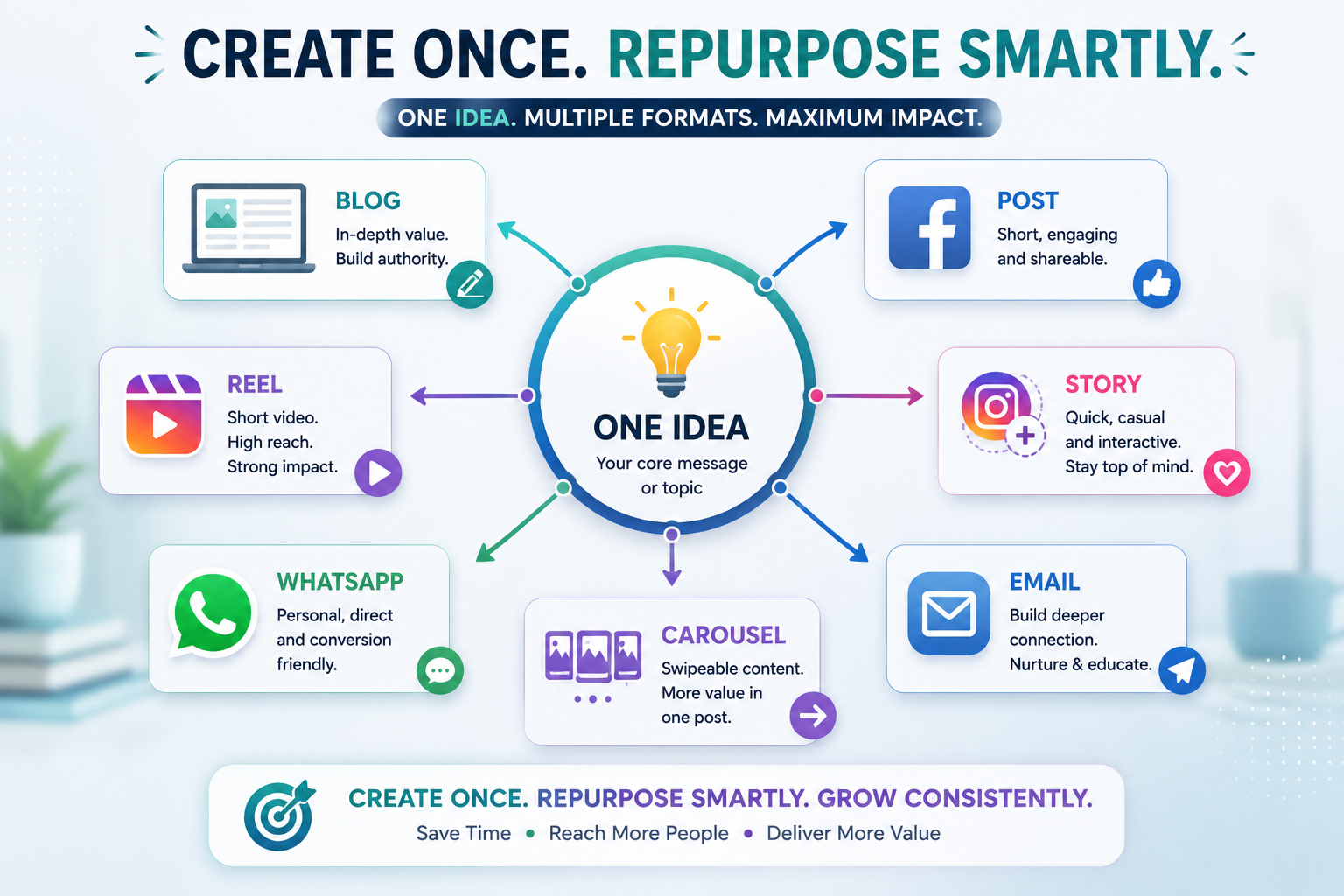
एक Idea से कौन-कौन से Content Formats बन सकते हैं?
Central idea को detailed explanation, examples और practical tips के साथ एक educational blog section में बदला जा सकता है। यह website पर long-form value देने के लिए useful हो सकता है।
उसी idea को conversational style में short Facebook post बनाया जा सकता है। इसमें एक relatable opening, key message और discussion-oriented ending रखी जा सकती है।
LinkedIn के लिए वही concept productivity, workflow और professional efficiency के angle से present किया जा सकता है।
Instagram caption में central message को concise रखते हुए practical insight, short example और relevant call-to-action जोड़ा जा सकता है।
Idea को 30 या 60-second short video script में बदला जा सकता है। Hook → Problem → Value → Example → CTA जैसे structure का उपयोग किया जा सकता है।
अगर आपको किसी contact या community के साथ एक useful insight share करनी है, तो उसी idea को short, natural और conversational WhatsApp message में बदला जा सकता है।
एक central idea को तीन से पाँच short story slides में divide किया जा सकता है। हर slide एक छोटे point को communicate कर सकती है।
Idea को multiple slides में break करके educational carousel बनाया जा सकता है। उदाहरण के लिए पहली slide पर problem, अगली slides पर practical uses और final slide पर takeaway रखा जा सकता है।
इसी idea को एक short educational email में convert किया जा सकता है जिसमें personal context, lesson और practical recommendation शामिल हो।
ChatGPT से Content Repurposing कैसे करवाएं?
सबसे पहले आपको ChatGPT को केवल “इस content को बदल दो” कहने के बजाय clear instructions देनी चाहिए। उसे बताइए कि original idea क्या है, target audience कौन है और किस format के लिए content चाहिए।
“My central idea is: AI can save time for network marketers. My audience is beginner network marketers. First explain the idea in simple language. Then create: 1 Facebook post, 1 LinkedIn post, 1 Instagram caption, 1 short Reel script, 1 WhatsApp message, and 1 five-slide carousel outline. Keep the message educational, natural and practical. Avoid exaggerated claims.”
इस तरह एक ही prompt से आपको multiple starting drafts मिल सकते हैं। इसके बाद आप प्रत्येक format को separately review और personalize कर सकते हैं।
Central Idea Same, Context Different
Content repurposing की सबसे important बात यह है कि core message consistent रह सकता है, लेकिन context platform के अनुसार बदलना चाहिए।
उदाहरण के लिए “AI can save time” को Facebook पर daily productivity के रूप में explain किया जा सकता है, जबकि LinkedIn पर इसे workflow efficiency के angle से present किया जा सकता है। Reel में इसे एक relatable problem से शुरू किया जा सकता है और WhatsApp पर इसे एक short conversational tip की तरह share किया जा सकता है।
Key Idea: Repurposing का मतलब copy-paste करना नहीं है। इसका मतलब है एक valuable idea को अलग-अलग audience contexts और content formats के लिए intelligently adapt करना।
एक Long-Form Article से पूरा Content Set
मान लीजिए आपने अपनी website के लिए “AI for Network Marketers” पर एक detailed article लिखा है। उस article को publish करने के बाद उसका काम खत्म नहीं होना चाहिए।
आप उसी article के अलग-अलग sections से पूरे महीने के लिए कई content pieces तैयार कर सकते हैं। उदाहरण के लिए:
- Article से एक Facebook educational post।
- एक section से LinkedIn insight।
- एक key point से Instagram caption।
- एक practical tip से Reel script।
- तीन key points से carousel।
- एक FAQ से WhatsApp message।
- Article summary से email newsletter।
- Important points से Story sequence।
इस approach से आपको हर दिन completely new topic invent करने की जरूरत कम हो सकती है। आपका existing content एक valuable source material की तरह काम करता है।
Content Repurposing का Practical Workflow
इस Strategy से क्या फायदा होगा?
Content repurposing का सबसे बड़ा फायदा केवल time saving नहीं है। यह आपके content को अधिक consistently distribute करने में भी मदद कर सकता है।
एक अच्छा idea अलग-अलग formats में दिखाई देने के कारण आपकी audience को वही important message अलग-अलग ways में समझने का अवसर मिलता है। कुछ लोग blogs पढ़ना पसंद करते हैं, कुछ short videos देखते हैं, कुछ social posts पढ़ते हैं और कुछ quick messages पसंद करते हैं।
इसलिए एक ही valuable idea को multiple formats में adapt करना आपकी overall content strategy को ज्यादा flexible बना सकता है।
Content Repurposing में Common Mistakes
- हर platform पर बिल्कुल same content copy-paste करना।
- Platform की audience और format को ignore करना।
- AI-generated drafts को बिना editing के publish करना।
- एक ही idea को इतना repeat करना कि audience को repetitive लगे।
- Original content में genuine value न होना।
- हर repurposed content को promotional बना देना।
- Personal experience और authentic examples को remove कर देना।
Important: Repurposing का उद्देश्य quantity बढ़ाना नहीं, बल्कि एक अच्छी quality idea की value को अलग-अलग useful contexts में effectively distribute करना है।
AI की Speed + Human Context
ChatGPT बहुत तेजी से drafts और variations generate कर सकता है। लेकिन यह तय करना कि आपके audience के लिए कौन-सा format सही है, कौन-सा example relevant है और कौन-सी language आपके personality से match करती है—यह human judgement का हिस्सा है।
इसलिए best workflow यह नहीं है कि आप एक idea दें और ChatGPT को पूरा content system independently बनाने दें। बेहतर workflow है कि आप direction दें, AI से variations बनवाएँ, फिर अपने experience और judgement से उन्हें refine करें।
ChatGPT आपका content creator नहीं, बल्कि content repurposing assistant है। Original value आपकी है; AI उसे अलग-अलग formats में efficiently adapt करने में मदद करता है।
अब तक हमने देखा कि ChatGPT से ideas, posts, captions, Reel scripts, follow-ups, FAQs और repurposed content तैयार किया जा सकता है। अगला step यह समझना है कि इन सभी activities को एक practical daily workflow में कैसे organize किया जाए, ताकि AI का इस्तेमाल random तरीके से नहीं बल्कि एक clear system के साथ किया जा सके।
11. Personal Branding में ChatGPT का इस्तेमाल
Network marketing में केवल information share करना ही पर्याप्त नहीं है। लोग यह भी जानना चाहते हैं कि information किस व्यक्ति से आ रही है। आपकी communication style, आपकी सोच, आपका experience और किसी topic को explain करने का आपका तरीका धीरे-धीरे आपकी Personal Brand का हिस्सा बनता है।
ChatGPT आपको content creation में faster बना सकता है, लेकिन अगर हर बार AI का generic output बिना बदलाव के publish किया जाए, तो आपके content में आपकी individual personality कम दिखाई दे सकती है।
इसलिए Personal Branding के लिए ChatGPT का सही use यह है कि AI आपके लिए structure और drafting में मदद करे, जबकि आपकी voice और experience content को authentic बनाए।
AI-Generated Content की Common Problem: Generic Voice
Generic Voice का मतलब है ऐसा content जो technically सही हो, लेकिन पढ़ने पर यह महसूस न हो कि इसे किसी particular व्यक्ति ने अपनी personality और experience के साथ लिखा है।
अगर बहुत सारे लोग ChatGPT से एक ही तरह के prompts देकर content बनाते हैं और उसे बिना personalization के publish करते हैं, तो उनके posts एक जैसे लग सकते हैं। Language polished हो सकती है, लेकिन personal identity दिखाई नहीं दे सकती।
Personal Branding का उद्देश्य केवल अच्छा content बनाना नहीं है। उद्देश्य यह भी है कि audience समय के साथ आपकी communication style को पहचानने लगे। इसलिए AI का इस्तेमाल करते समय अपनी identity और preferences को context देना important है।
ChatGPT को अपनी Communication Style का Context दें
ChatGPT को केवल topic बताने के बजाय यह भी बताइए कि आप किस तरह communicate करना पसंद करते हैं। जितना relevant context आप देंगे, उतना ही आपके desired style के करीब initial draft आने की संभावना बढ़ेगी।
उदाहरण के लिए बताइए कि आपका content beginner network marketers, new entrepreneurs या किसी specific audience के लिए है।
आप friendly, professional, conversational, educational या encouraging tone prefer करते हैं, यह स्पष्ट कर सकते हैं।
अगर आपकी preference simple और easy-to-understand language है, तो ChatGPT को यह instruction दें।
इससे AI को यह direction मिलती है कि content का focus केवल promotion नहीं, बल्कि learning और practical value पर होना चाहिए।
इससे content को ज्यादा natural और relationship-focused रखने में मदद मिल सकती है।
यह instruction AI को abstract explanation के बजाय relatable examples शामिल करने की direction देता है।
एक Useful Personal Branding Prompt
इन preferences को एक reusable prompt में combine किया जा सकता है। इससे हर बार शुरुआत से अपनी communication style explain करने की जरूरत कम हो सकती है।
“Act as my content writing assistant. My audience is beginner network marketers. My communication style is friendly, simple and educational. I prefer conversational language and practical examples. Avoid aggressive sales language, exaggerated claims and unnecessary jargon. Make the content useful and easy to understand. Keep my personal voice natural rather than making it sound overly polished.”
यह prompt एक starting framework है। जैसे-जैसे आपको अपने content के बारे में clarity मिलती है, आप इसमें अपनी specific preferences और भी add कर सकते हैं।
अपने पुराने Writing Samples का इस्तेमाल करें
अगर आपने पहले से blog posts, social media posts, emails या अन्य content लिखा है, तो आप उनमें से कुछ samples ChatGPT को reference के रूप में दे सकते हैं।
इससे AI को केवल आपके बताए हुए adjectives जैसे “friendly” या “professional” पर depend नहीं करना पड़ता। उसे आपकी actual writing के examples से structure, sentence style, level of explanation और communication pattern समझने में मदद मिल सकती है।
“नीचे मेरे पुराने writing samples दिए गए हैं। इन samples को मेरी writing style समझने के reference के रूप में use करो। जब मैं future content लिखने को कहूँ, तो इसी तरह की natural, simple और educational communication style maintain करने की कोशिश करो। मेरे ideas को copy मत करो; केवल writing style और communication pattern को reference मानो।”
लेकिन Writing Sample का मतलब Blind Copy नहीं है
पुराने content को reference देने का उद्देश्य यह नहीं है कि ChatGPT आपके पुराने sentences को बार-बार reproduce करे। आपका goal होना चाहिए कि AI आपकी preferred communication style को समझे और नए ideas पर उसी general voice में draft तैयार करे।
इसलिए हर नए content piece में fresh examples, current context और आपकी वास्तविक thinking शामिल होनी चाहिए।
Reference का सही उपयोग:
“मेरी writing simple, conversational और practical है। इसी style को नए topic पर apply करो।”
Reference का गलत उपयोग:
“मेरे पुराने post की lines को बदलकर नया post बना दो।”
Generic Content को Personal कैसे बनाएं?
मान लीजिए ChatGPT ने आपको एक generic paragraph दिया है: “Consistency is important for success. Keep creating content and stay active.”
यह statement broadly useful हो सकती है, लेकिन इसमें आपकी personal experience दिखाई नहीं देती। इसे बेहतर बनाने के लिए आप ChatGPT को अपना वास्तविक experience दे सकते हैं।
“मैंने शुरुआत में कई बार perfect content बनाने की कोशिश की और इसी वजह से posting irregular हो गई। बाद में मैंने simple content को consistently publish करना शुरू किया।”
Better Direction“इस experience को use करके consistency पर एक simple educational post लिखो। Tone personal और conversational रखो। कोई exaggerated success claim मत जोड़ो।”
अब content में केवल general advice नहीं रहेगी। उसमें आपकी वास्तविक learning का element भी शामिल होगा। यही difference Personal Branding को stronger बना सकता है।
आपकी Voice और AI की Structure में क्या Difference है?
ChatGPT structure बनाने में बहुत useful हो सकता है। उदाहरण के लिए वह आपको Hook → Problem → Insight → Example → Takeaway जैसी structure दे सकता है।
लेकिन उस structure में कौन-सा example आएगा, आपका actual experience क्या है, आपकी audience की situation क्या है और आप किस तरह बात करना पसंद करते हैं— यह input आपसे आना चाहिए।
Think of it this way: ChatGPT आपको content का framework दे सकता है, लेकिन आपकी story, आपकी learning और आपकी perspective content को identity देती है।
Personal Branding में ChatGPT का Practical Workflow
सबसे पहले स्पष्ट करें कि आप किस audience से communicate कर रहे हैं।
अपनी preferred tone, language और communication style को describe करें।
Topic, purpose, audience problem और relevant background information दें।
जहाँ relevant हो, अपना real experience, observation या example शामिल करें।
ChatGPT से initial structure और content draft तैयार करवाएँ।
AI-generated language को अपनी natural communication style में edit करें।
Facts, claims, examples और overall message को अपने judgement से check करें।
Personal Branding में किन Mistakes से बचें?
- हर topic के लिए generic one-line prompt इस्तेमाल करना।
- AI-generated content को बिना editing के publish करना।
- अपने real experience को content से completely remove कर देना।
- हर post में overly polished और unnatural language इस्तेमाल करना।
- Audience को समझे बिना केवल trending topics पर content बनाना।
- दूसरों की writing style को blindly copy करने की कोशिश करना।
- AI को अपनी personal judgement और decision-making का replacement मान लेना।
Important: Personal Branding का मतलब हर sentence को perfect बनाना नहीं है। इसका मतलब है कि आपके content में आपकी genuine thinking, experience और communication style दिखाई दे।
Authenticity के लिए Final Review Checklist
Content publish करने से पहले खुद से कुछ simple questions पूछें:
- क्या यह content मेरे audience के लिए genuinely useful है?
- क्या इसकी language मेरी natural communication जैसी लगती है?
- क्या इसमें मेरा कोई real experience या perspective शामिल है?
- क्या examples मेरे actual context से relevant हैं?
- क्या इसमें unnecessary sales language तो नहीं है?
- क्या मैंने AI के claims और information को review किया है?
- क्या मैं इस content को अपने नाम से confidently publish कर सकता हूँ?
अगर इन questions के answers positive हैं, तो AI की सहायता लेने के बावजूद content आपकी Personal Brand का हिस्सा बन सकता है।
AI को अपनी Voice का Assistant बनाइए
Personal Branding के लिए सबसे effective approach यह है कि ChatGPT को अपनी voice का replacement न बनाकर उसका assistant बनाया जाए।
आप direction दें, अपनी audience और context समझाएँ, relevant experience share करें, AI से structure और draft बनवाएँ और फिर final content को अपने judgement से refine करें।
इस तरह technology आपके content creation को faster बना सकती है, जबकि आपकी identity, values और personal experience content में बनी रहती है।
एक strong Personal Brand की foundation AI नहीं, बल्कि आपकी own experience, perspective और genuine connection है। ChatGPT उस foundation को communicate करने में आपकी मदद कर सकता है।
अब तक आपने देखा कि ChatGPT से content ideas, social posts, captions, Reel scripts, follow-ups, FAQs, content repurposing और Personal Branding में मदद ली जा सकती है। अगला logical step है यह समझना कि इन सभी capabilities को एक simple और repeatable daily workflow में कैसे जोड़ा जाए, ताकि ChatGPT का इस्तेमाल केवल अलग-अलग tasks के लिए नहीं बल्कि एक practical content system के रूप में किया जा सके।
12. ChatGPT से Daily Productivity Improve करें
अब तक हमने ChatGPT को मुख्य रूप से content creation, ideas, social media, follow-up, FAQs, content repurposing और Personal Branding के context में समझा है। लेकिन ChatGPT की usefulness केवल writing तक सीमित नहीं है।
Network marketing में रोज कई तरह के tasks होते हैं—planning, prioritization, content preparation, follow-ups, learning, research, meetings और छोटे-बड़े administrative काम। अगर इन सभी activities को बिना किसी structure के manage किया जाए, तो दिन busy होने के बावजूद important work पीछे रह सकता है।
यहाँ ChatGPT को एक planning और thinking assistant की तरह use किया जा सकता है। यह आपके लिए final decisions नहीं लेता, लेकिन आपके ideas और tasks को organize करने, बड़े काम को छोटे steps में divide करने और review process को structured बनाने में मदद कर सकता है।
Productivity का मतलब सिर्फ ज्यादा काम करना नहीं है
Productivity को अक्सर इस तरह देखा जाता है कि एक व्यक्ति दिन में ज्यादा से ज्यादा tasks complete करे। लेकिन practical productivity का बेहतर मतलब है: सही समय पर सही काम पर focus करना।
उदाहरण के लिए, अगर आपके पास दस tasks हैं और आप पूरे दिन केवल छोटे और आसान tasks करते रहे, तो आपको busy होने का feeling मिल सकता है, लेकिन जरूरी काम शायद पूरा न हो।
इसलिए daily planning में केवल task list बनाना पर्याप्त नहीं है। आपको यह भी तय करना होता है कि कौन-सा task सबसे important है, कौन-सा बाद में किया जा सकता है और कौन-सा task किसी दूसरे दिन के लिए रखा जा सकता है।
1. Morning Planning
दिन की शुरुआत में सबसे useful habits में से एक है अपने important tasks को identify करना। अगर सुबह आपके पास बहुत लंबी और unorganized task list है, तो शुरुआत कहाँ से करनी है यह तय करने में ही समय जा सकता है।
ChatGPT आपकी existing task list को priority के हिसाब से organize करने में मदद कर सकता है।
“Help me organize today’s most important business tasks into a simple priority list. Group them into Must Do, Should Do and Can Wait. Keep the list practical and realistic.”
इसके बाद आप अपने tasks को तीन simple levels में देख सकते हैं:
इस तरह आपकी पूरी task list एक clear direction में बदल सकती है। हालांकि final priority आपको अपने actual business situation के आधार पर तय करनी चाहिए।
2. Task Breakdown — बड़े काम को छोटे Steps में बदलें
कई बार समस्या यह नहीं होती कि हमें पता नहीं है कि क्या करना है। समस्या यह होती है कि task बहुत बड़ा दिखाई देता है।
उदाहरण के लिए “अपनी website के लिए content strategy तैयार करना” एक बड़ा task है। इसे देखकर शुरुआत करना difficult लग सकता है।
ऐसे task को छोटे और manageable steps में divide करने के लिए ChatGPT का उपयोग किया जा सकता है।
“Break this large project into five manageable steps. For each step, explain what needs to be done and what the expected outcome should be. Keep the steps simple enough for a beginner to follow.”
अब बड़ा project एक single overwhelming task नहीं रहेगा। वह छोटे actions की sequence बन जाएगा।
Large Task: “एक महीने का content plan बनाना”
इसे इस तरह divide किया जा सकता है:
- Target audience define करना
- Main topics की list बनाना
- Topics को content categories में divide करना
- Weekly content schedule बनाना
- पहले week के content drafts तैयार करना
इस approach का फायदा यह है कि आपको पूरा project एक साथ complete करने के बारे में सोचने की जरूरत नहीं होती। आप केवल अगले step पर focus कर सकते हैं।
3. Time Blocking में ChatGPT की मदद
Task list बनाने के बाद अगला challenge होता है कि उन्हें दिन में कब किया जाए। हर व्यक्ति की working style अलग होती है, इसलिए ChatGPT को आपकी available working hours और priorities बताकर एक basic schedule का draft बनवाया जा सकता है।
“I have three hours available today for business work. My priorities are content creation, follow-up and learning. Suggest a simple time-blocking plan with short breaks. Keep the schedule realistic and avoid overloading the day.”
ध्यान रखें कि AI द्वारा बनाया गया schedule केवल एक starting point है। आपकी actual energy level, meetings, personal responsibilities और unexpected tasks के अनुसार schedule को adjust करना जरूरी है।
4. Daily Content Planning
अगर आप regularly social media या website content publish करते हैं, तो daily content planning में भी ChatGPT useful हो सकता है।
उदाहरण के लिए, आप ChatGPT को अपने weekly topics की list दे सकते हैं और उससे पूछ सकते हैं कि कौन-से topic को किस दिन और किस format में use करना practical रहेगा।
“Create a simple seven-day content plan for beginner network marketers. Include one educational topic, one practical tip, one personal experience, one FAQ, one short-video idea and two engagement-focused posts. Keep the plan realistic and easy to execute.”
इससे आपको हर सुबह यह सोचने में कम समय लग सकता है कि आज क्या create करना है। आपका focus execution पर ज्यादा रह सकता है।
5. Weekly Review
Productivity केवल planning से improve नहीं होती। Review भी उतना ही important है। अगर आप हर week वही mistakes repeat करते हैं, तो केवल ज्यादा मेहनत करने से system बेहतर नहीं होगा।
Weekly review के दौरान आप यह देख सकते हैं कि इस week आपने क्या किया, क्या पूरा नहीं हुआ, कहाँ ज्यादा time लगा और अगले week क्या improve किया जा सकता है।
“Help me review my content activities this week and identify what I can improve next week. Organize the review into: What Worked, What Did Not Work, What Took Too Much Time, and What I Should Try Next Week.”
अगर आप अपने actual activities और observations ChatGPT को देंगे, तो वह उन्हें structured review format में organize करने में मदद कर सकता है।
6. Daily Task List को Action List में बदलें
कई task lists केवल nouns की तरह लिखी होती हैं—जैसे “Content”, “Follow-up”, “Website” या “Learning”। ऐसी list में next action clear नहीं होता।
ChatGPT आपकी broad task list को specific actions में बदलने में मदद कर सकता है।
“Convert this list of broad tasks into specific actionable tasks. Each task should begin with a clear action verb and should be small enough to complete in one focused work session.”
उदाहरण के लिए “Content” को “अगले तीन content topics select करना”, “एक topic का outline बनाना” और “पहले draft को review करना” जैसे actions में बदला जा सकता है।
7. Brain Dump को Organized Plan में बदलें
कभी-कभी हमारे mind में बहुत सारे ideas, tasks और reminders एक साथ होते हैं। इसे simple language में brain dump कहा जा सकता है।
आप अपने thoughts को पहले बिना किसी particular order के लिख सकते हैं और फिर ChatGPT से उन्हें categories में organize करने के लिए कह सकते हैं।
“I am going to give you an unorganized list of ideas and tasks. Organize them into Content, Follow-up, Website, Learning and Personal Admin. Then identify which items appear most important and suggest a simple order for handling them.”
यह approach mental clutter को कम करने में मदद कर सकती है क्योंकि आपके scattered thoughts एक structured list में बदल जाते हैं।
8. Productivity में ChatGPT का सही Role
यहाँ एक important distinction समझना जरूरी है। ChatGPT आपकी productivity को improve करने में मदद कर सकता है, लेकिन वह आपकी productivity की responsibility अपने ऊपर नहीं ले सकता।
AI plan बना सकता है, tasks organize कर सकता है और options suggest कर सकता है। लेकिन plan को execute करना, priorities बदलना और final decision लेना आपको ही होगा।
Simple Rule: ChatGPT से “मेरे लिए decide करो” की जगह “मेरे options को organize करने और सोचने में मेरी मदद करो” कहना ज्यादा useful approach है।
Daily Productivity के लिए Simple Workflow
सुबह या पिछली शाम अपने सभी important tasks और ideas लिखें।
ChatGPT की मदद से tasks को importance और urgency के अनुसार organize करें।
बड़े projects को छोटे और actionable steps में divide करें।
अपने available time के अनुसार practical work blocks तय करें।
एक समय में एक important task पर focus करके काम करें।
दिन या week के अंत में देखें कि क्या complete हुआ और क्या improve किया जा सकता है।
Productivity Improve करते समय इन Mistakes से बचें
- हर छोटे task के लिए ChatGPT पर unnecessarily depend करना।
- Planning में इतना समय लगाना कि actual execution के लिए समय कम बच जाए।
- AI द्वारा बनाया गया unrealistic schedule blindly follow करना।
- एक दिन में बहुत ज्यादा goals रखना।
- Important और urgent tasks के बीच difference ignore करना।
- Weekly review न करना।
- AI के suggestions को अपने actual circumstances से ऊपर रखना।
Remember: Productivity का उद्देश्य आपकी task list को जितना संभव हो उतना बड़ा बनाना नहीं है। उद्देश्य है important work को clarity और consistency के साथ पूरा करना।
एक Simple Daily Example
मान लीजिए आपके पास आज पाँच काम हैं:
- एक social media post बनाना
- कुछ follow-ups करना
- Website पर एक section update करना
- 30 minutes learning करना
- अगले week के content ideas collect करना
ChatGPT की मदद से आप इन्हें priority में arrange कर सकते हैं, बड़े tasks को smaller actions में divide कर सकते हैं और available time के अनुसार एक simple work sequence बना सकते हैं।
लेकिन अगर किसी दिन कोई important prospect conversation या unexpected business task आ जाता है, तो आपको अपनी priority list बदलनी होगी। यही human judgement है।
ChatGPT को planning assistant की तरह इस्तेमाल करने का उद्देश्य आपके ऊपर से responsibility हटाना नहीं, बल्कि आपके thinking process को clearer और more structured बनाना है।
इस तरह ChatGPT केवल content लिखने वाला tool नहीं रह जाता। यह आपके daily planning, task breakdown, content scheduling और weekly review जैसे activities में एक practical thinking assistant बन सकता है। जब आप AI की speed को अपनी judgement और discipline के साथ combine करते हैं, तब technology आपकी productivity को genuinely support कर सकती है।
13. ChatGPT + Other AI Tools
अब तक हमने देखा कि ChatGPT को content ideas, writing, social media posts, Reel scripts, FAQs, follow-ups, Personal Branding और daily productivity के लिए कैसे इस्तेमाल किया जा सकता है। लेकिन practical digital workflow में ChatGPT अकेला tool होना जरूरी नहीं है।
आज कई तरह के AI और digital tools अलग-अलग कामों में मदद कर सकते हैं। कोई writing में useful हो सकता है, कोई images बनाने में, कोई graphic design में और कोई video creation में। इसलिए ChatGPT को एक complete workflow के एक हिस्से के रूप में भी देखा जा सकता है।
लेकिन यहाँ एक बहुत important principle है: More tools ≠ Better workflow.
एक Complete AI Workflow कैसा दिख सकता है?
एक simple content workflow को इस तरह समझ सकते हैं:
सबसे पहले topic, angle, audience problem या content idea identify किया जा सकता है।
Idea को outline, article, social post, caption या script के रूप में develop किया जा सकता है।
एक useful piece of content तैयार किया जाता है जिसे आगे कई formats में इस्तेमाल किया जा सके।
जरूरत के अनुसार article या post के लिए supporting visual तैयार किया जा सकता है।
Visuals, social graphics, carousels या branded layouts को final design में बदला जा सकता है।
Script और visual assets की मदद से short-form video या Reel तैयार की जा सकती है।
Final content publish करने के बाद comments, questions और audience interactions पर ध्यान दिया जाता है।
यह केवल एक example workflow है। हर व्यक्ति को हर step के लिए अलग AI tool की आवश्यकता नहीं होती। आपके काम, skill level, budget और content requirements के अनुसार workflow छोटा या बड़ा हो सकता है।
ChatGPT का Role कहाँ सबसे Useful हो सकता है?
इस workflow में ChatGPT को एक central thinking और content assistant की तरह रखा जा सकता है। यह कई अलग-अलग stages के बीच connection बनाने में मदद कर सकता है।
किसी broad topic से content angles, questions, hooks और educational ideas निकालने में मदद।
Blog, post, email, carousel या video script के लिए logical structure तैयार करने में मदद।
एक existing idea को अलग-अलग platforms और formats के लिए adapt करने में सहायता।
किसी content project को छोटे steps में divide करने और execution sequence organize करने में मदद।
हर Tool का अपना Specific Role रखें
एक common mistake यह होती है कि लोग कई tools इस्तेमाल करना शुरू कर देते हैं, लेकिन यह clear नहीं रखते कि कौन-सा tool किस काम के लिए है।
इसका result अक्सर यह होता है कि एक simple task के लिए कई platforms open करने पड़ते हैं, files अलग-अलग जगह save करनी पड़ती हैं और बार-बार content transfer करना पड़ता है। इससे productivity बढ़ने के बजाय workflow complicated हो सकता है।
ChatGPT → Idea + Outline + Draft
Design Tool → Visual + Carousel
Video Tool → Short Video
Social Platform → Publish + Engagement
यहाँ हर tool का role clearly defined है। इससे unnecessary tool switching कम हो सकती है।
एक ही काम के लिए दस Tools की जरूरत नहीं
अगर आप शुरुआत कर रहे हैं, तो सबसे पहले basic workflow establish करना बेहतर हो सकता है। आपको यह साबित करने की जरूरत नहीं है कि आप कितने AI tools इस्तेमाल कर सकते हैं।
असली सवाल यह है: क्या आपके tools आपका काम आसान बना रहे हैं?
अगर एक simple content task के लिए आपको बहुत सारे tools के बीच लगातार switch करना पड़ रहा है, तो शायद आपका system unnecessarily complicated हो गया है।
More Tools ≠ More Productivity
अगर 10 tools आपकी productivity बढ़ाने के बजाय confusion, duplicate work, subscription costs या decision fatigue बढ़ा रहे हैं, तो workflow simplify करना बेहतर है।
Beginner के लिए Simple AI Stack
एक beginner को शुरुआत में बहुत बड़ा technology stack बनाने की जरूरत नहीं होती। पहले उन tasks को identify करें जिनमें आपको सबसे ज्यादा समय लगता है।
- अगर ideas और writing में ज्यादा समय लगता है, तो ChatGPT से शुरुआत करें।
- अगर social graphics बनाना difficult है, तो एक simple design tool सीखें।
- अगर short videos बनाना आपका focus है, तो एक suitable video tool चुनें।
- अगर workflow manage करना मुश्किल है, तो simple planning system बनाएं।
धीरे-धीरे जरूरत के अनुसार tools add किए जा सकते हैं। पहले problem identify करें, फिर उसके लिए tool चुनें—न कि पहले tool चुनें और फिर उसके लिए problem खोजें।
Tool चुनते समय किन बातों पर ध्यान दें?
- Purpose: यह tool किस specific problem को solve करता है?
- Ease of Use: क्या आप इसे consistently इस्तेमाल कर पाएँगे?
- Time Saving: क्या यह वास्तव में आपका समय बचाता है?
- Quality: क्या इसका output आपके standard के अनुसार है?
- Integration: क्या यह आपके existing workflow के साथ आसानी से काम करता है?
- Cost: क्या इसका खर्च आपके actual use के हिसाब से justified है?
- Learning Curve: क्या इसे सीखने में इतना समय लगेगा कि benefit ही कम हो जाए?
AI Tools को Workflow के हिसाब से सोचिए
एक powerful mindset यह है कि आप individual tools की list याद करने के बजाय पूरा workflow देखें।
उदाहरण के लिए आपका objective हो सकता है: “हर week एक valuable educational content piece publish करना।”
अब workflow होगा: Idea → Research → Outline → Writing → Visual → Design → Publish → Engage → Review
इस workflow के हर stage पर देखें कि आपको वास्तव में किस assistance की जरूरत है। जहाँ manual work simple और manageable है, वहाँ tool जोड़ने की जरूरत नहीं। जहाँ कोई repetitive या time-consuming task है, वहाँ AI या digital tool useful हो सकता है।
Content Quality को Tools की Quantity से ऊपर रखें
कई tools होने का मतलब automatically बेहतर content नहीं है। अगर central idea weak है, audience की जरूरत clear नहीं है या message useful नहीं है, तो tools की संख्या बढ़ाने से content की quality automatically improve नहीं होगी।
इसके विपरीत, एक strong idea और clear audience understanding के साथ simple tools का छोटा workflow भी बहुत effective हो सकता है।
Technology को process serve करना चाहिए। Process को technology के लिए unnecessarily complicated नहीं बनाना चाहिए।
एक Practical Content Workflow का Example
मान लीजिए आप “Consistency is more important than perfection” पर content बनाना चाहते हैं।
अपने audience के लिए central message और practical lesson decide करें।
Topic का outline, examples और initial draft तैयार करवाएँ।
अपना experience, observation और natural communication style add करें।
जरूरत के अनुसार supporting graphic या carousel तैयार करें।
उसी idea को short Reel में बदलना हो तो script और visual assets का उपयोग करें।
सही platform पर content publish करें और audience engagement पर ध्यान दें।
देखें कि audience ने किस तरह respond किया और अगली बार क्या improve किया जा सकता है।
सबसे Important: Tool नहीं, System सीखिए
AI tools तेजी से बदल सकते हैं। आज जो tool popular है, भविष्य में उससे बेहतर या अलग option available हो सकता है। इसलिए केवल किसी particular tool के buttons और features याद करना long-term strategy नहीं है।
ज्यादा valuable skill यह समझना है कि आपका workflow कैसे काम करता है: idea कहाँ से आता है, content कैसे बनता है, visual कैसे तैयार होता है, publish कैसे होता है और audience feedback से अगला content कैसे improve होता है।
जब आपको workflow समझ में आ जाता है, तब किसी नए tool को उसमें add या replace करना comparatively आसान हो जाता है।
ChatGPT और दूसरे AI tools powerful assistants हो सकते हैं, लेकिन सबसे effective system वही है जिसे आप आसानी से समझ सकें, consistently use कर सकें और अपने real goals के साथ connect कर सकें।
इस point तक हमने ChatGPT के कई practical uses देखे हैं—ideas से लेकर content creation, communication, productivity, Personal Branding और अब complete AI workflow तक। अगला step यह समझना है कि AI का इस्तेमाल करते समय किन common mistakes और limitations को ध्यान में रखना चाहिए, ताकि technology का फायदा लेते हुए quality, authenticity और responsible communication भी बनी रहे।
14. ChatGPT इस्तेमाल करते समय 10 Common Mistakes
ChatGPT एक powerful tool है, लेकिन किसी भी tool की तरह इसका result इस बात पर depend करता है कि आप इसे कैसे use करते हैं। सही तरीके से इस्तेमाल करने पर यह ideas, writing, planning, communication और content creation में आपका समय बचा सकता है।
लेकिन अगर AI को बिना context, बिना review और बिना human judgement के इस्तेमाल किया जाए, तो वही speed कई problems भी create कर सकती है। खासकर network marketing जैसे relationship-driven field में communication की quality और authenticity बहुत important हैं।
इसलिए ChatGPT को effectively use करने के लिए केवल यह जानना पर्याप्त नहीं है कि “AI क्या कर सकता है?” यह जानना भी जरूरी है कि “AI का इस्तेमाल करते समय किन mistakes से बचना चाहिए?”
1. बहुत Vague Prompt देना
बहुत vague prompt
अगर आप ChatGPT को केवल इतना कहते हैं— “Network marketing पर एक post लिखो।” तो AI के पास audience, purpose, tone और format के बारे में पर्याप्त context नहीं है।
Result technically ठीक हो सकता है, लेकिन वह generic भी हो सकता है।
Audience, goal, topic, format, tone और important constraints को prompt में स्पष्ट करें।
2. Audience नहीं बताना
Audience को ignore करना
Beginner और experienced network marketer को एक ही topic की अलग level की explanation चाहिए। अगर आप ChatGPT को audience नहीं बताते, तो output सही direction में होने के बावजूद आपके readers के लिए perfectly suitable नहीं हो सकता।
इसलिए prompt में हमेशा यह स्पष्ट करना useful है कि content किसके लिए बनाया जा रहा है।
Topic + Audience = Better Context
3. AI Output को Copy-Paste करना
AI output को final content मान लेना
ChatGPT आपको अच्छा draft दे सकता है, लेकिन उसे बिना edit किए publish करने पर आपकी personal voice कम दिखाई दे सकती है।
खासकर Personal Branding में यह important है कि content में आपका experience, perspective और natural communication style दिखाई दे।
Better Workflow: AI Draft → Review → Edit → Personalize → Publish
4. Fact-Check न करना
हर AI answer को automatically accurate मान लेना
ChatGPT useful information और drafts generate कर सकता है, लेकिन इसका मतलब यह नहीं है कि हर generated statement automatically verified fact है।
खासकर statistics, current information, business-related claims, financial statements, policies या किसी specific organization से जुड़ी information को publish करने से पहले appropriate sources से verify करना जरूरी है।
Remember: AI का output एक starting point हो सकता है। Important claims को final publish करने से पहले independently verify करें।
5. हर चीज़ AI से करवाना
अपनी own thinking को replace कर देना
ChatGPT को हर decision, हर idea और हर communication के लिए use करना convenient लग सकता है। लेकिन अगर आप लगातार अपनी सोचने की प्रक्रिया AI को hand over कर देते हैं, तो आपकी own problem-solving और creative thinking का practice कम हो सकता है।
बेहतर approach यह है कि पहले खुद सोचें, फिर जहाँ जरूरत हो वहाँ ChatGPT का उपयोग ideas expand करने, options compare करने या structure बनाने के लिए करें।
Think First → Use AI to Improve → Decide Yourself
6. AI की Speed को Spam में बदल देना
Spammy Communication
ChatGPT की मदद से आप बहुत सारे messages तेजी से तैयार कर सकते हैं। लेकिन speed का मतलब यह नहीं है कि आपको हर contact को लगातार messages भेजने चाहिए।
Network marketing में relationships और trust important हैं। अगर AI की speed को mass copy-paste messaging में बदल दिया जाए, तो communication helpful होने के बजाय spammy लग सकती है।
प्रत्येक conversation का context समझें, relevant message लिखें और सामने वाले की response तथा interest का सम्मान करें।
7. Sensitive Information Share करना
Private या Confidential Information को unnecessarily enter करना
AI tools के साथ काम करते समय privacy और confidentiality का ध्यान रखना जरूरी है। किसी व्यक्ति की private information, confidential business data, passwords, financial details या अन्य sensitive information को unnecessarily AI tools में enter नहीं करना चाहिए।
अगर किसी task को complete करने के लिए personal details की आवश्यकता नहीं है, तो उन details को remove या anonymize करना बेहतर approach हो सकता है।
Simple Rule: जिस information को आप public या unnecessary third-party processing के लिए share नहीं करना चाहेंगे, उसे AI prompt में डालने से पहले carefully सोचें।
8. Overly Promotional Content बनाना
हर Post को Sales Pitch बना देना
ChatGPT से promotional content बनाना आसान है। लेकिन अगर आपकी हर social media post, हर message और हर conversation केवल selling के बारे में है, तो audience धीरे-धीरे disengage हो सकती है।
एक healthy content strategy में education, practical tips, personal experiences, questions, stories और useful information का balance होना चाहिए।
Think Value First: पहले पूछें—“यह content मेरे audience के लिए useful कैसे है?” उसके बाद promotion के बारे में सोचें।
9. Audience को भूल जाना
AI के लिए Prompt लिखना आसान है; इंसान के लिए Useful Content बनाना Goal है
कभी-कभी हम prompt को इतना optimize करने में व्यस्त हो जाते हैं कि original objective ही भूल जाते हैं। हमें AI के लिए impressive prompt नहीं बनाना है। हमें अपने audience के लिए useful content बनाना है।
इसलिए हर content piece से पहले यह समझना जरूरी है कि audience की problem क्या है, उन्हें किस information की जरूरत है और इस content के बाद उन्हें क्या clarity या value मिलेगी।
“अगर मैं reader की जगह होता, तो क्या यह content मेरे लिए genuinely useful होता?”
10. AI को Strategy समझ लेना
AI एक Tool है — Strategy आपकी है
ChatGPT content ideas दे सकता है, plans suggest कर सकता है और different options organize कर सकता है। लेकिन आपकी overall business strategy आपकी responsibility है।
कौन-सी audience को target करना है, किस तरह का relationship build करना है, कौन-से goals important हैं, कौन-सी activities आपके लिए सही हैं और किस direction में आगे बढ़ना है—इन decisions में आपकी understanding और judgement सबसे important है।
AI can support the strategy. It should not become the strategy.
इन 10 Mistakes से बचने का Simple Framework
इन सभी mistakes को याद रखने के लिए आप एक simple workflow अपना सकते हैं। जब भी ChatGPT का इस्तेमाल करें, केवल output पर focus न करें। पूरे process को देखें।
पहले खुद समझें कि आपको क्या achieve करना है।
Audience, purpose और relevant background information दें।
Clear और specific instruction लिखें।
ChatGPT से initial ideas या draft लें।
Important facts, claims और information check करें।
अपनी voice, experience और real context जोड़ें।
Privacy, tone, usefulness और overall quality check करें।
Final decision अपने judgement से लें।
एक Final Pre-Publish Checklist
किसी AI-assisted post, article या message को publish या send करने से पहले खुद से ये questions पूछना एक अच्छी habit हो सकती है:
- क्या मेरा prompt clear था?
- क्या मैंने audience को ध्यान में रखा?
- क्या मैंने AI output को review किया?
- क्या important facts और claims verify किए?
- क्या इसमें मेरी own voice दिखाई दे रही है?
- क्या मैंने unnecessary private information share तो नहीं की?
- क्या communication helpful है या सिर्फ promotional?
- क्या यह content मेरे audience के लिए genuinely useful है?
- क्या final decision मैंने अपने judgement से लिया है?
अच्छा AI workflow केवल fast content बनाने के बारे में नहीं है। यह सही context, responsible use, authentic communication और thoughtful decision-making के बारे में भी है।
ChatGPT का सबसे effective उपयोग तब होता है जब आप इसे एक intelligent assistant की तरह इस्तेमाल करते हैं—न कि अपनी thinking, relationships और strategy के replacement की तरह। Clear prompts, fact-checking, personalization, privacy awareness और audience-first thinking आपके AI workflow को ज्यादा useful और responsible बना सकते हैं।
आखिरकार technology की value इस बात से तय नहीं होती कि आपने कितने AI tools इस्तेमाल किए, बल्कि इस बात से तय होती है कि आपने उनका उपयोग कितनी clarity और समझदारी से किया।
15. AI Assistant Hai, Replacement Nahi
इस पूरे article में हमने ChatGPT के कई practical uses देखे हैं—content ideas, social media posts, captions, Reel scripts, follow-up messages, FAQs, content repurposing, Personal Branding, productivity और दूसरे AI tools के साथ workflow तक।
लेकिन इन सभी use cases के बीच एक principle सबसे ज्यादा important है: AI आपके काम को support कर सकता है, लेकिन आपकी human value को replace नहीं कर सकता।
Network marketing एक relationship-driven business है। यहाँ technology आपकी speed, organization और content creation को improve कर सकती है, लेकिन trust, empathy, communication और genuine human connection की जगह नहीं ले सकती।
पूरे article का Core Principle:
ChatGPT को ऐसा assistant समझिए जो आपके repetitive और time-consuming tasks में आपकी मदद करता है, ताकि आप अपना समय उन activities पर लगा सकें जहाँ human connection सबसे ज्यादा important है।
AI क्या कर सकता है — और आप क्या करते हैं?
AI की strength और human strength अलग-अलग हैं। AI information को organize कर सकता है, drafts तैयार कर सकता है और कई variations generate कर सकता है। लेकिन एक relationship को समझना, सामने वाले की feelings को recognize करना और सही समय पर सही तरीके से communicate करना human responsibility है।
AI Draft और Human Connection में फर्क
मान लीजिए किसी prospect ने आपको message किया कि वह business के बारे में interested है, लेकिन उसे समझ नहीं आ रहा कि शुरुआत कैसे करे।
ChatGPT आपके लिए एक polite और informative response draft कर सकता है। लेकिन ChatGPT को आपकी और उस व्यक्ति की पिछली conversation का पूरा emotional context automatically नहीं पता होगा।
आपको याद हो सकता है कि उस व्यक्ति ने पहले किसी specific concern के बारे में बताया था, उसके पास limited time है या वह अभी केवल information समझना चाहता है।
Message को clear, concise और respectful तरीके से structure करने में मदद करना।
आपका Role:Previous conversation को समझना, सही context जोड़ना और सामने वाले व्यक्ति से genuinely human तरीके से communicate करना।
यही difference AI-assisted communication और AI-replaced communication के बीच है।
Relationship Building को Automate करने की कोशिश न करें
Network marketing में technology का उपयोग communication को support करने के लिए किया जा सकता है, लेकिन relationship building को पूरी तरह automate करने की कोशिश counterproductive हो सकती है।
किसी व्यक्ति को एक personalized message भेजना और किसी व्यक्ति के साथ genuinely बातचीत करना एक ही चीज नहीं है।
Relationship केवल message से नहीं बनती। Relationship समय, consistency, listening, trust और genuine interest से बनती है।
Important: ChatGPT की मदद से एक हजार messages तैयार करना आसान हो सकता है, लेकिन इसका मतलब यह नहीं है कि आपको एक हजार लोगों को वही message भेज देना चाहिए।
Efficiency should improve communication—not turn communication into spam.
AI से बचा हुआ Time कहाँ लगाना चाहिए?
अगर ChatGPT आपकी content planning, drafting और repetitive tasks में आपका कुछ समय बचाता है, तो उस extra time का सबसे valuable उपयोग केवल और ज्यादा AI-generated content बनाना नहीं है।
उस समय को उन activities में लगाना ज्यादा meaningful हो सकता है जहाँ human interaction और personal development की जरूरत होती है।
- लोगों से बेहतर communication करने में
- Prospects की जरूरतों को समझने में
- Existing relationships को मजबूत करने में
- अपनी communication skills improve करने में
- अपने industry और products के बारे में learning करने में
- अपने personal experiences को document करने में
- Audience की real problems को observe करने में
- अपने business goals और strategy को review करने में
यही AI का practical benefit है—AI आपके लिए समय पैदा कर सकता है, और आप उस समय का उपयोग higher-value human activities में कर सकते हैं।
AI को Assistant की तरह इस्तेमाल करने का सही Workflow
पहले आप तय करें कि क्या करना है और क्यों करना है।
ChatGPT से ideas, structure, drafts या options लेने में मदद लें।
Output को facts, context, tone और usefulness के आधार पर check करें।
अपना experience, examples, personality और natural communication style जोड़ें।
Final decision अपने judgement और actual situation के आधार पर लें।
Content या message के पीछे मौजूद human relationship को priority दें।
AI आपकी Personality की जगह नहीं ले सकता
Personal Branding के context में यह बात और भी important हो जाती है। Audience केवल यह नहीं देखती कि आपने क्या कहा। समय के साथ वे यह भी notice करती है कि आप कैसे सोचते हैं, किस तरह explain करते हैं और किन values के साथ communicate करते हैं।
आपकी journey में जो lessons आपने सीखे हैं, आपकी mistakes, आपकी observations, आपकी communication style और लोगों के साथ आपके genuine experiences— यही आपकी personal identity का हिस्सा हैं।
ChatGPT इन experiences को structure करने में मदद कर सकता है, लेकिन वह उन experiences को आपकी जगह जी नहीं सकता।
Think of AI as an amplifier.
अगर आपके पास clear ideas, useful experience और genuine perspective है, तो AI उन्हें ज्यादा efficiently communicate करने में मदद कर सकता है। लेकिन अगर human input ही नहीं है, तो केवल AI की speed authenticity create नहीं कर सकती।
Smart AI Usage का मतलब क्या है?
Smart AI usage का मतलब यह नहीं है कि हर काम में AI का इस्तेमाल किया जाए। इसका मतलब है कि जहाँ AI वास्तव में value add करता है, वहाँ उसका उपयोग किया जाए— और जहाँ human judgement या human connection ज्यादा important है, वहाँ उसे priority दी जाए।
उदाहरण के लिए, content ideas generate करना AI का अच्छा use हो सकता है। लेकिन यह decide करना कि आपके किसी पुराने contact से किस विषय पर genuinely बात करनी चाहिए, उस relationship के context को समझने के कारण human judgement का काम हो सकता है।
इसी तरह एक Reel script ChatGPT से बनवाई जा सकती है, लेकिन camera के सामने आपकी voice, आपका experience और आपकी natural personality ही audience के साथ connection बनाती है।
AI can assist your work,
but it cannot replace your relationships.
Human + AI Collaboration
Future-ready network marketer वह नहीं है जो केवल AI पर depend करता है। बेहतर approach वह है जिसमें human strengths और AI capabilities को intelligently combine किया जाए।
AI speed, structure और efficiency ला सकता है। Human side trust, empathy, judgement, creativity और relationships ला सकता है।
जब दोनों को सही role दिया जाता है, तब technology human work को replace करने के बजाय उसे stronger बना सकती है।
Human: Goal, Experience, Context, Values, Relationships
AI: Ideas, Structure, Drafts, Variations, Organization
Human: Review, Personalize, Decide, Communicate, Connect
इस पूरे Article से सबसे बड़ा Lesson
ChatGPT को केवल एक writing tool की तरह देखने से इसकी usefulness सीमित हो जाती है। यह एक thinking, planning, content और productivity assistant की तरह भी काम कर सकता है।
लेकिन जितना powerful AI होता जाता है, उतना ही important यह समझना हो जाता है कि कौन-से काम AI को देने हैं और कौन-से काम अपने पास रखने हैं।
Draft AI कर सकता है। Final voice आपकी होनी चाहिए।
Ideas AI दे सकता है। Experience आपका होना चाहिए।
Message AI structure कर सकता है। Conversation में empathy आपकी होनी चाहिए।
Planning AI में मदद कर सकता है। Strategy और decisions आपके होने चाहिए।
अगर AI की वजह से आपके पास अधिक समय बचता है, तो उस समय को बेहतर communication, learning और relationship building में लगाइए।
यही Smart AI Usage है।
यही इस practical beginner’s guide का central message है: AI को अपना assistant बनाइए, अपनी identity और relationships का replacement नहीं। Technology आपके काम को faster और more organized बना सकती है, लेकिन आपके business की सबसे valuable asset अब भी आपकी human connection ही है।
16. 7-Day ChatGPT Beginner Challenge
अब तक हमने देखा कि ChatGPT क्या है, बेहतर prompts कैसे लिखें और network marketing के अलग-अलग कामों में इसका practical use कैसे किया जा सकता है। लेकिन केवल theory समझना पर्याप्त नहीं है।
असली learning तब शुरू होती है जब आप खुद ChatGPT को अपने काम में इस्तेमाल करना शुरू करते हैं। इसलिए अब theory को action में बदलने के लिए एक simple 7-Day ChatGPT Beginner Challenge करते हैं।
इस challenge को इस तरह बनाया गया है कि beginner भी रोज़ थोड़ा-सा समय देकर ChatGPT के साथ practical experience हासिल कर सके।
Challenge कैसे करें?
आपको सात दिनों तक रोज़ केवल एक practical activity करनी है। हर दिन का task पिछले दिन के काम पर आधारित होगा। इसका मतलब है कि Day 1 में बनाया गया idea आगे Day 2, Day 3 और Day 4 में भी इस्तेमाल किया जा सकता है।
इससे आपको केवल ChatGPT के अलग-अलग features समझने के बजाय एक complete content workflow देखने और practice करने का मौका मिलेगा।
अपने network marketing audience के लिए ChatGPT से 10 useful content ideas generate करें। ऐसे topics चुनें जो आपके audience की problems, questions या learning needs से जुड़े हों।
सभी ideas में से कम-से-कम एक ऐसा topic चुनें जिस पर आप वास्तव में अपने experience से बात कर सकते हैं।
Day 1 में चुने गए एक idea को एक simple educational social media post में बदलें। ध्यान रखें कि post का उद्देश्य केवल promotion नहीं, बल्कि audience को कुछ useful सिखाना हो।
ChatGPT से मिले draft को 그대로 publish करने के बजाय अपनी language, experience और examples जोड़ें।
अब उसी topic के लिए 10 अलग-अलग hooks बनवाएं। Hook का उद्देश्य reader या viewer का attention naturally capture करना है।
फिर देखें कि कौन-सा hook आपकी personality और audience के लिए सबसे natural लगता है। हर catchy line जरूरी नहीं कि आपके personal brand के लिए सही हो।
अब उसी topic को एक short Reel में बदलें। ChatGPT से लगभग 30-second की script बनवाएं जिसमें hook, main value और simple closing हो।
Script को पढ़ते समय अगर कोई sentence बोलने में artificial लगे, तो उसे अपनी बोलने की style में बदल दें। Reel script पढ़ने के लिए नहीं, naturally बोलने के लिए होती है।
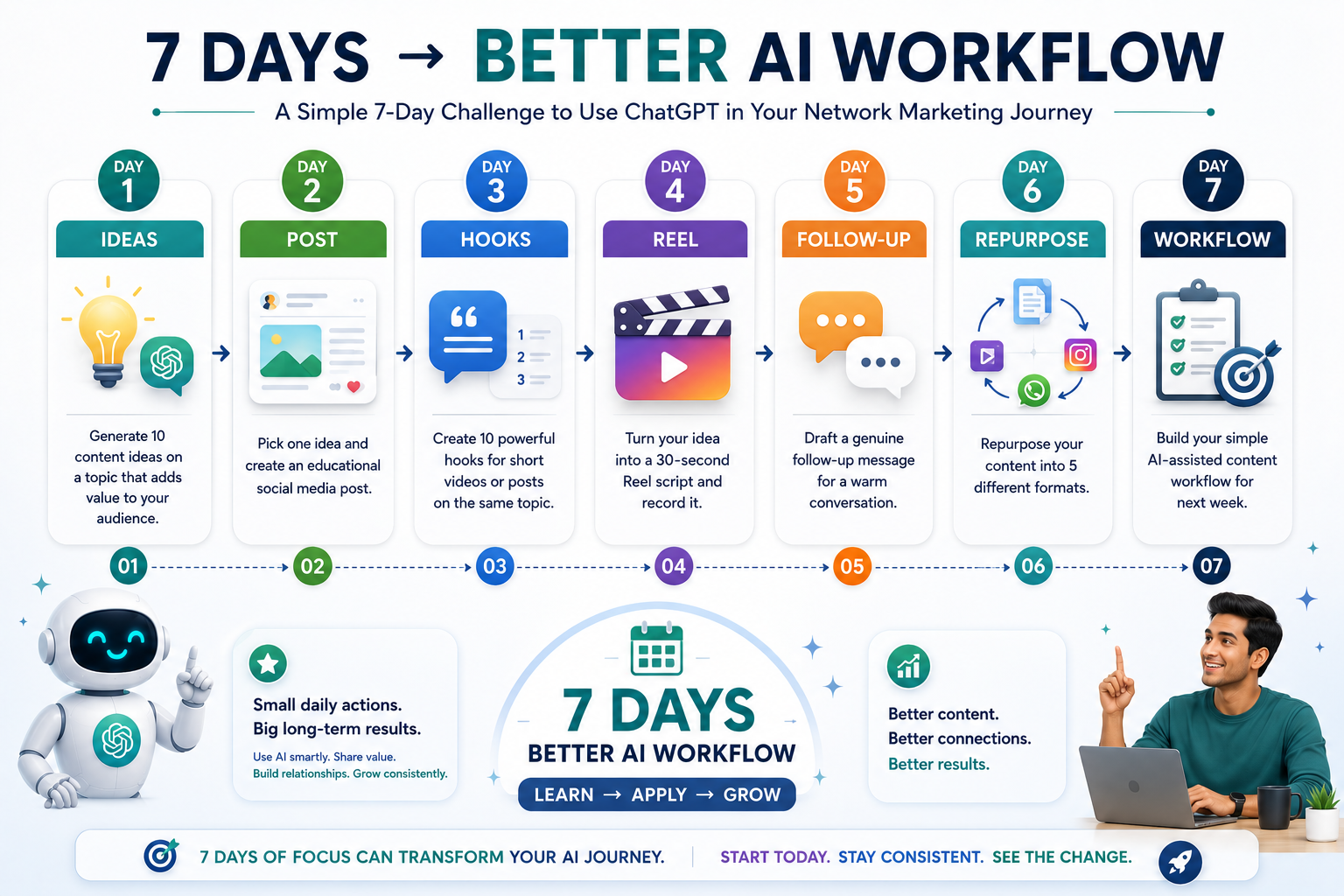
अब एक वास्तविक follow-up situation चुनें। उदाहरण के लिए किसी व्यक्ति ने आपके message को देखा लेकिन reply नहीं किया, या उसने पहले interest दिखाया था लेकिन आगे conversation नहीं हुई।
यहाँ सबसे महत्वपूर्ण बात यह है कि AI message को relationship का replacement न बनाएं। Message भेजने से पहले context check करें और जरूरत के अनुसार उसे personalize करें।
Day 1 के उसी content idea को पांच अलग formats में बदलें। इससे आपको समझ आएगा कि एक quality idea को बार-बार नए context में कैसे इस्तेमाल किया जा सकता है।
यहाँ goal केवल content की quantity बढ़ाना नहीं है। Goal है unnecessary rewriting का workload कम करना।
अब पूरे सप्ताह के experience को देखकर अपने अगले सप्ताह का simple AI-assisted content workflow तैयार करें।
Workflow ऐसा रखें जिसे आप वास्तव में follow कर सकें। बहुत complicated system बनाने के बजाय ऐसा process बनाएं जो आपकी daily routine में आसानी से fit हो।
7 Days के बाद आपको क्या समझ आना चाहिए?
इस challenge का उद्देश्य आपको ChatGPT expert बनाना नहीं है। आपको हर feature, हर prompt technique या हर AI tool सीखने की जरूरत नहीं है।
सात दिनों के बाद आपको बस इतना स्पष्ट होना चाहिए कि आपके अपने काम में कौन-से tasks AI की मदद से faster, easier या better organized हो सकते हैं।
आपको यह सीखना है:
“मैं AI को अपने daily workflow में intelligently कहाँ use कर सकता हूँ?”
यही question आपको AI को केवल एक experiment की तरह इस्तेमाल करने से आगे बढ़ाकर एक practical productivity assistant की तरह इस्तेमाल करना सिखाता है।
Challenge के दौरान यह Simple Checklist रखें
- क्या मैंने AI को clear context दिया?
- क्या output मेरे audience के लिए useful है?
- क्या मैंने AI-generated content को review किया?
- क्या मैंने अपनी personal experience और voice जोड़ी?
- क्या content जरूरत से ज्यादा promotional तो नहीं है?
- क्या AI ने मेरा समय बचाया या workflow को complicated किया?
- क्या बचा हुआ समय मैं बेहतर communication और relationship building में लगा सकता हूँ?
एक Important Mindset Shift
सात दिनों के बाद सबसे बड़ा result शायद 10 posts या कई scripts तैयार होना नहीं होगा। असली result यह होगा कि आपको अपने काम को एक नए perspective से देखने की आदत बनने लगेगी।
आप धीरे-धीरे पहचान पाएंगे कि कौन-सा काम आपको खुद करना चाहिए, कौन-सा काम ChatGPT से assist कराया जा सकता है, और कहाँ human judgement सबसे ज्यादा important है।
Smart AI Usage का मतलब है: हर काम AI से करवाना नहीं, बल्कि सही काम के लिए सही समय पर AI की मदद लेना।
अगर आपने इन सात दिनों के tasks को honestly practice किया, तो आपने केवल ChatGPT के साथ experiment नहीं किया होगा; आपने अपने लिए एक basic AI-assisted working system बनाना शुरू कर दिया होगा।
अब अगला कदम यह समझना है कि इस knowledge को long-term strategy में कैसे बदला जाए, ताकि AI का इस्तेमाल सिर्फ occasional मदद के लिए नहीं, बल्कि sustainable और responsible growth के लिए किया जा सके।
17. Your Simple Daily ChatGPT Workflow
अब तक हमने इस article में ChatGPT के कई practical uses देखे हैं— content ideas, social media posts, hooks, Reel scripts, follow-up messages, FAQs, content repurposing, productivity और personal branding तक।
लेकिन इन सभी activities का सबसे बड़ा फायदा तब मिलता है जब इन्हें अलग-अलग tasks की तरह करने के बजाय एक simple daily workflow में जोड़ दिया जाए।
आपका goal यह नहीं होना चाहिए कि आप पूरे दिन AI के साथ काम करते रहें। Goal यह होना चाहिए कि AI आपके workflow के सही हिस्सों में आपका समय और effort बचाए।
एक Simple AI-Assisted Workflow
एक practical daily workflow को इन दस steps में समझा जा सकता है:
सबसे पहले तय करें कि आज आपको वास्तव में क्या achieve करना है। हर available task करने की कोशिश न करें। आज के सबसे important outcome पर focus करें।
अब सोचें कि आज audience के लिए कौन-सा useful topic बनाया जा सकता है। जरूरत पड़ने पर ChatGPT से ideas, angles या topic variations ले सकते हैं।
चुने हुए idea का first draft ChatGPT की मदद से तैयार करें। Post, caption, article section, Reel script या कोई अन्य format हो सकता है।
अब सबसे important human step आता है। Draft में अपनी voice, personal experience, examples, opinions और audience की वास्तविक needs जोड़ें।
Content के लिए relevant visual तैयार करें। Visual का purpose केवल decoration नहीं होना चाहिए; उसे content की understanding या attention को support करना चाहिए।
अगर content useful है, तो उसे दूसरे formats में convert करें। एक idea को post, caption, Reel, WhatsApp message या carousel जैसे formats में adapt किया जा सकता है।
Publish करने से पहले accuracy, clarity, tone, grammar और overall usefulness check करें। AI-generated information को blindly accept न करें।
Final content को appropriate platform पर share करें। Platform के हिसाब से format, length और presentation को adjust करें।
Publishing के बाद काम खत्म नहीं होता। Comments, replies और genuine conversations के माध्यम से audience से connect करें।
देखें कि लोगों ने किस content पर बेहतर response दिया, कहाँ questions आए और क्या improve किया जा सकता है। इन learnings को अगले content में apply करें।
इस Workflow में ChatGPT कहाँ मदद करता है?
ध्यान देने वाली बात यह है कि workflow के हर step में ChatGPT का इस्तेमाल जरूरी नहीं है। यही intelligent AI usage का important हिस्सा है।
उदाहरण के लिए, PLAN में आप खुद अपनी priorities तय कर सकते हैं। IDEATE में ChatGPT ideas दे सकता है। CREATE में वह first draft तैयार करने में मदद कर सकता है। PERSONALIZE में आपका human input सबसे important है। REVIEW में AI एक additional perspective दे सकता है, लेकिन final judgement आपकी होनी चाहिए।
Simple Example:
मान लीजिए आज आपका goal है—beginner network marketers के लिए एक educational post तैयार करना।
आप पहले topic चुनते हैं → ChatGPT से ideas लेते हैं → first draft बनवाते हैं → अपना experience जोड़ते हैं → relevant visual तैयार करते हैं → उसी idea को Reel या WhatsApp message में repurpose करते हैं → final content review करते हैं → publish करते हैं → audience के comments और questions का जवाब देते हैं।
अगले दिन आप देखते हैं कि audience ने किस point पर सबसे ज्यादा response दिया। यही learning आपके अगले content को बेहतर बनाती है।
Workflow को Simple क्यों रखना चाहिए?
AI tools की संख्या बढ़ने के साथ workflow अक्सर complicated भी हो सकता है। एक व्यक्ति ideas के लिए एक tool, writing के लिए दूसरा, visuals के लिए तीसरा, videos के लिए चौथा और automation के लिए पांचवां tool इस्तेमाल करने लगता है।
अगर tools productivity बढ़ाने के बजाय confusion बढ़ा रहे हैं, तो workflow को simplify करना बेहतर है।
Remember: आपको सबसे ज्यादा AI tools की जरूरत नहीं है। आपको एक ऐसा simple system चाहिए जिसे आप consistently follow कर सकें।
Daily Workflow के लिए Quick Checklist
- क्या आज का main goal clear है?
- क्या topic audience के लिए genuinely useful है?
- क्या मैंने ChatGPT को पर्याप्त context दिया?
- क्या मैंने AI draft में अपनी voice और experience जोड़ा?
- क्या visual content को support कर रहा है?
- क्या मैंने content को publish करने से पहले review किया?
- क्या मैं audience के साथ genuine conversation कर रहा हूँ?
- क्या मैंने आज की learning को अगले content में use किया?
सबसे Important बात
इस workflow का उद्देश्य आपको ज्यादा busy बनाना नहीं है। इसका उद्देश्य repetitive work को व्यवस्थित करना है ताकि आपका समय उन activities के लिए बच सके जहाँ आपकी personal involvement सबसे ज्यादा valuable है।
AI ideas दे सकता है, draft बना सकता है और content को अलग formats में convert कर सकता है। लेकिन audience को समझना, सही message चुनना, अपनी कहानी share करना, relationships बनाना और final decision लेना अभी भी आपकी responsibility है।
अगर आप इस workflow को धीरे-धीरे अपनी daily routine का हिस्सा बना लेते हैं, तो ChatGPT केवल एक writing tool नहीं रहेगा। यह आपके content planning और execution process का एक practical assistant बन सकता है।
और सबसे अच्छी बात यह है कि आपको शुरुआत में पूरा system perfect बनाने की जरूरत नहीं है। एक छोटा workflow शुरू करें, उसे कुछ दिनों तक use करें, फिर अपने experience के आधार पर उसे improve करते रहें।
18. Final ChatGPT Checklist
आपने content idea से लेकर writing, hooks, Reels, follow-up, repurposing और daily workflow तक ChatGPT के कई practical uses देखे हैं। अब content publish करने से पहले एक final quality check करना भी उतना ही important है।
AI की मदद से content जल्दी तैयार हो सकता है, लेकिन जल्दी तैयार होना और सही content होना एक ही बात नहीं है। Publish करने से पहले कुछ simple questions खुद से पूछने की आदत आपके content की quality, authenticity और trust को बेहतर बना सकती है।
Publish करने से पहले यह 10-Point Checklist देखें
1. क्या Content Useful है?
सबसे पहले खुद से पूछें—इस content से audience को वास्तव में क्या मिलेगा?
अगर post केवल इसलिए बनाया गया है क्योंकि आज कुछ publish करना है, तो उसमें value कम हो सकती है। एक अच्छा content किसी question का answer दे सकता है, कोई problem समझा सकता है, कोई practical tip दे सकता है या audience को एक useful perspective दे सकता है।
2. क्या Information Accurate है?
ChatGPT आपको information organize करने और draft बनाने में मदद कर सकता है, लेकिन important facts, numbers, claims, product information या business-related details publish करने से पहले खुद verify करना जरूरी है।
विशेष रूप से ऐसी information के मामले में जो आपके audience के decisions को प्रभावित कर सकती है, केवल AI output पर निर्भर न रहें।
3. क्या Language मेरे जैसी लगती है?
अगर content पढ़ने पर ऐसा लगता है कि यह किसी generic AI template से निकला है, तो उसे personalize करने की जरूरत है।
अपने सामान्य words, बोलने की style, examples और communication pattern को content में शामिल करें। आपका audience केवल information नहीं पढ़ रहा होता—वह आपकी personality भी experience कर रहा होता है।
4. क्या मैंने अपना Experience Add किया है?
यही वह हिस्सा है जहाँ आपका content दूसरे generic AI-generated content से अलग हो सकता है।
अगर आपने किसी situation को personally experience किया है, कोई mistake की है, कुछ सीखा है या किसी process को practically इस्तेमाल किया है, तो उस experience को content में जोड़ें।
AI structure दे सकता है, लेकिन आपका experience content को personal बनाता है।
5. क्या Audience को कुछ सीखने को मिलेगा?
हर content का उद्देश्य direct selling होना जरूरी नहीं है। कई बार एक simple educational post, useful example या honest experience long-term trust बनाने में ज्यादा valuable हो सकता है।
Publish करने से पहले सोचें: अगर मैं audience की जगह होता, तो क्या मुझे यह content पढ़कर कुछ useful मिलता?
6. क्या CTA Natural है?
Call to Action यानी CTA reader को अगला step बताता है। लेकिन हर post का CTA “Buy Now”, “Join Now” या किसी direct sales action की तरह होना जरूरी नहीं है।
Educational content में natural CTA हो सकता है: “आपका experience क्या रहा?” “अगर यह useful लगा तो save कर लें।” या “इस topic पर आपका क्या सवाल है?”
CTA conversation शुरू करे तो वह relationship-building content के लिए अधिक natural महसूस हो सकता है।
7. क्या कोई Exaggerated Claim है?
AI कभी-कभी language को ज्यादा impressive बनाने की कोशिश कर सकता है। इसलिए ऐसे statements पर विशेष ध्यान दें जो guaranteed results, unrealistic income, instant success या बिना evidence के बड़े promises करते हों।
अपने content में realistic और responsible language का इस्तेमाल करें। Trust बनाने में honest communication long-term में ज्यादा valuable है।
8. क्या मैंने Sensitive Information Protect की है?
Content तैयार करते समय किसी व्यक्ति की private details, confidential business information या ऐसी personal information को unnecessarily include न करें जिसकी public sharing उचित नहीं है।
AI workflow का हिस्सा बनाते समय privacy को भी workflow का हिस्सा समझें।
9. क्या यह Content Relationship Build करता है?
Network marketing में content केवल reach या views के लिए नहीं होता। इसका एक important purpose audience के साथ trust और meaningful connection बनाना भी है।
इसलिए publish करने से पहले देखें कि content helpful, respectful और human है या नहीं। क्या यह audience को समझने की कोशिश करता है? क्या यह conversation की जगह बनाता है?
10. क्या मैंने AI Output को Blindly Copy नहीं किया?
यह पूरी checklist का सबसे important final question है।
ChatGPT का draft useful starting point हो सकता है, लेकिन final content आपकी responsibility है। उसे पढ़ें, समझें, edit करें, facts verify करें और अपनी voice में personalize करें।
एक Simple Pre-Publish Process
अगर आप हर बार पूरी checklist को detail में नहीं पढ़ना चाहते, तो इसे एक simple process में याद रख सकते हैं:
Useful → Accurate → Personal → Natural → Responsible → Publish
पहले देखें कि content useful है। फिर accuracy check करें। उसके बाद अपनी voice और experience जोड़ें। CTA और tone को natural बनाएं। exaggerated claims और privacy issues check करें। और अंत में publish करें।
इस Checklist का असली उद्देश्य
यह checklist आपको AI का इस्तेमाल करने से रोकने के लिए नहीं है। इसका उद्देश्य यह सुनिश्चित करना है कि AI की speed के कारण content की quality, authenticity या human connection compromise न हो।
अगर इन questions के answers positive हैं, तो आपका AI-assisted content publish करने के लिए काफी बेहतर position में है।
Final Principle:
ChatGPT आपका content faster बना सकता है, लेकिन उसे valuable, authentic और trustworthy बनाना आपकी responsibility है।
यही responsible AI usage है—technology का फायदा उठाना, लेकिन अपनी thinking, judgement, experience और human connection को हमेशा केंद्र में रखना।
19. Start Small — Grow Smart
ChatGPT और AI की दुनिया में शुरुआत करते समय सबसे common mistake यह होती है कि हम एक साथ बहुत सारी चीजें सीखने की कोशिश करने लगते हैं। अलग-अलग AI tools, features, prompts और workflows देखकर ऐसा लग सकता है कि productive बनने के लिए हमें सब कुछ सीखना जरूरी है।
लेकिन practical reality अलग है। आपको एक साथ 20 अलग-अलग AI tools सीखने की जरूरत नहीं है। शुरुआत के लिए एक simple problem चुनना और उसे AI की मदद से बेहतर तरीके से solve करना कहीं ज्यादा useful approach है।
एक Simple Problem से शुरुआत करें
सबसे पहले अपने daily work में ऐसी एक activity पहचानिए जो बार-बार होती है और जिसमें आपका काफी समय लगता है।
उदाहरण के लिए, अगर आपको रोज़ यह सोचने में समय लगता है कि “आज social media पर क्या post करूं?”, तो शुरुआत content ideas से कीजिए।
ChatGPT को उस problem के बारे में context दीजिए और उससे practical suggestions लीजिए। कुछ दिनों तक उसे इस्तेमाल कीजिए और देखिए कि क्या इससे आपका समय बच रहा है और क्या ideas की quality बेहतर हो रही है।
पहला लक्ष्य expert बनना नहीं है। पहला लक्ष्य है—एक वास्तविक problem को थोड़ा आसान बनाना।
Step 1 — Ideas से शुरुआत करें
अगर content topics सोचने में परेशानी होती है, तो ChatGPT से अपने audience और niche के अनुसार ideas generate करवाएं।
शुरुआत में केवल 10 useful ideas मांगना भी पर्याप्त है। फिर उनमें से एक idea चुनकर उसे अपने experience के अनुसार develop करें।
Step 2 — Ideas को Posts में बदलें
जब ideas generate करना comfortable हो जाए, तो अगला step उस idea को educational social media post में बदलना हो सकता है।
यहाँ ChatGPT first draft, structure, headline या different angles देने में मदद कर सकता है। लेकिन final language आपकी अपनी होनी चाहिए।
Step 3 — Posts से Reels की तरफ बढ़ें
अब उसी topic को short-form video content में convert करना सीखें। ChatGPT से hook, structure और 30-second script तैयार करवाई जा सकती है।
फिर script को अपनी natural speaking style में adapt करें। इससे एक ही idea से अलग content format बनाना आसान हो जाता है।
Step 4 — Follow-Up को Better बनाएं
Content creation के बाद आप communication में भी AI assistance का उपयोग शुरू कर सकते हैं। उदाहरण के लिए, किसी genuine follow-up situation में ChatGPT से respectful और conversational message का draft लिया जा सकता है।
लेकिन relationship-based communication में context और human judgement सबसे important हैं। AI message को blindly भेजने के बजाय उसे situation के अनुसार personalize करें।
Step 5 — Repurposing सीखें
जब एक content idea तैयार हो जाए, तो उसे अलग-अलग formats में convert करना अगला natural step है।
एक idea को Facebook post, Instagram caption, Reel script, WhatsApp message या carousel outline में बदलकर आप unnecessary rewriting कम कर सकते हैं।
Step 6 — Productivity में AI को शामिल करें
धीरे-धीरे ChatGPT को केवल content creation तक सीमित रखने के बजाय planning और organization में भी use किया जा सकता है।
Daily priorities organize करना, बड़े project को छोटे steps में तोड़ना, weekly review करना या ideas को व्यवस्थित करना जैसे tasks में AI एक useful assistant बन सकता है।
आपका Learning Path कुछ ऐसा हो सकता है
Ideas → Posts → Reels → Follow-Up → Repurposing → Productivity
आपको यह पूरी journey एक ही दिन में complete नहीं करनी है। एक skill comfortable होने के बाद अगली skill जोड़ना ज्यादा sustainable approach है।
Too Many Tools से बचें
आज AI tools की संख्या तेजी से बढ़ रही है। हर दिन कोई नया writing tool, image tool, video tool या automation platform सामने आ सकता है।
इसका मतलब यह नहीं है कि आपको हर नया tool तुरंत सीखना चाहिए। अगर आपके current workflow में ChatGPT आपकी जरूरत पूरी कर रहा है, तो केवल trend follow करने के लिए नया tool जोड़ना जरूरी नहीं है।
एक simple rule याद रखें: अगर कोई नया tool आपकी productivity बढ़ाने के बजाय learning time, confusion और complexity बढ़ा रहा है, तो शायद अभी आपको उसकी जरूरत नहीं है।
Consistency, Complexity से ज्यादा Important है
एक complicated AI system जिसे आप केवल दो दिन इस्तेमाल करें, उससे बेहतर एक simple workflow है जिसे आप अगले छह महीने consistently use कर सकें।
उदाहरण के लिए, अगर आप हर सप्ताह ChatGPT की मदद से 5 useful content ideas generate करते हैं, उनमें से 2 को posts में बदलते हैं और एक post को Reel में repurpose करते हैं, तो कुछ महीनों में आपके पास एक repeatable content system बन सकता है।
यही छोटे improvements समय के साथ compound होकर बड़ा difference create कर सकते हैं।
Small Improvements क्यों Powerful होते हैं?
मान लीजिए ChatGPT की मदद से आप रोज़ केवल 20–30 मिनट बचा पाते हैं। यह एक दिन में बहुत बड़ा बदलाव नहीं लगेगा। लेकिन अगर आप उस saved time को लगातार better planning, learning, content quality और audience communication में लगाते हैं, तो long-term impact काफी बड़ा हो सकता है।
इसी तरह एक बेहतर prompt, एक बेहतर content structure या एक बेहतर repurposing process हर बार थोड़ा-सा effort बचा सकता है। समय के साथ यही छोटे improvements एक powerful workflow बना सकते हैं।
अपना अगला छोटा कदम चुनें
खुद से यह सवाल पूछें:
“मेरे daily work में अभी सबसे simple कौन-सी problem है जिसे मैं ChatGPT की मदद से थोड़ा आसान बना सकता हूँ?”
उसी problem से शुरुआत करें। उसे solve करें। Result देखें। फिर अगला step जोड़ें।
याद रखिए, AI का smart user वह नहीं है जो सबसे ज्यादा tools जानता है। Smart user वह है जो समझता है कि किस problem के लिए AI का इस्तेमाल करना है, किस काम में human judgement रखना है और अपने workflow को कितना simple रखना है।
इसलिए जल्दी करने की जरूरत नहीं है। एक छोटा कदम उठाइए, उसे consistently practice कीजिए और फिर धीरे-धीरे अपने workflow को expand कीजिए। यही approach आपको AI को सिर्फ एक exciting technology की तरह नहीं, बल्कि अपने काम का practical और sustainable assistant बनाने में मदद कर सकती है।
20. Conclusion
इस पूरे article में हमने ChatGPT को केवल एक AI writing tool की तरह नहीं, बल्कि network marketing के daily workflow में इस्तेमाल किए जा सकने वाले एक practical assistant के रूप में समझने की कोशिश की है।
हमने देखा कि सही direction और context देने पर ChatGPT ideas generate करने, content तैयार करने, communication को organize करने और repetitive tasks को आसान बनाने में आपकी मदद कर सकता है।
लेकिन इस पूरी journey का सबसे important lesson technology नहीं, बल्कि technology और human effort के बीच सही balance है।
ChatGPT आपके लिए क्या कर सकता है?
इन सभी capabilities का common benefit एक है: आपका समय बचाना और आपके काम को अधिक organized बनाना।
लेकिन AI की Speed आपकी Identity नहीं है
ChatGPT content जल्दी तैयार कर सकता है। वह आपको कई ideas दे सकता है और एक ही idea को कई formats में बदल सकता है। लेकिन वह आपकी personal journey को उसी तरह अनुभव नहीं कर सकता जैसे आपने की है।
आपके experiences, आपकी सीख, आपकी mistakes, आपकी communication style और लोगों के साथ आपके वास्तविक relationships आपके अपने हैं।
AI आपकी efficiency बढ़ा सकता है।
आपकी authenticity आपकी है।
आपका experience आपका है।
आपके relationships आपके हैं।
ChatGPT को Replacement नहीं, Digital Co-Pilot बनाइए
एक co-pilot का काम पूरा journey अकेले तय करना नहीं होता। वह driver को information, suggestions और assistance देता है, लेकिन direction और final decisions driver के हाथ में रहते हैं।
इसी तरह ChatGPT को भी अपने business का replacement समझने के बजाय एक digital co-pilot की तरह इस्तेमाल करना ज्यादा practical approach है।
ChatGPT: Ideas और possibilities दे सकता है।
आप: तय करते हैं कि कौन-सा idea आपके audience के लिए सही है।
ChatGPT: First draft तैयार कर सकता है।
आप: उसमें अपना experience और voice जोड़ते हैं।
ChatGPT: Message structure कर सकता है।
आप: Context और empathy के साथ conversation करते हैं।
ChatGPT: आपका समय बचा सकता है।
आप: उस समय का उपयोग learning, communication और relationship building में करते हैं।
Efficiency और Authenticity का सही Balance
Speed, ideas, structure, drafting, organization और repetitive work में assistance।
Experience, empathy, judgement, relationships, personal stories और genuine connection।
Smart AI usage इन दोनों strengths को compete नहीं कराता। वह दोनों को एक साथ काम करने देता है।
अगर AI आपका repetitive workload कम करता है, तो बचा हुआ समय केवल और ज्यादा content बनाने में लगाने की जरूरत नहीं है। उस समय को audience को समझने, लोगों के questions सुनने, बेहतर communication सीखने और meaningful relationships बनाने में भी लगाया जा सकता है।
एक Simple Formula याद रखें
Use AI for Speed.
ChatGPT की मदद से ideas, drafts और repetitive work को faster बनाइए।
Use Your Experience for Authenticity.
अपने real experiences, lessons और personal voice को content में शामिल कीजिए।
Use Human Connection for Relationships.
Audience और prospects के साथ genuine conversations और trust building पर focus कीजिए।
Use Consistency for Long-Term Growth.
एक simple workflow बनाकर उसे लगातार improve और follow कीजिए।
AI का सही इस्तेमाल वास्तव में क्या है?
AI का smart use यह नहीं है कि हर sentence, हर message और हर decision किसी AI tool से करवाया जाए।
Smart use का मतलब है यह पहचानना कि कौन-सा काम AI तेजी से कर सकता है, कौन-सा काम आपके personal input की मांग करता है और कौन-सा काम पूरी तरह human interaction पर निर्भर है।
जब यह distinction clear हो जाता है, तब AI आपके काम को complicated करने के बजाय genuinely useful बनना शुरू करता है।
अब अगला कदम क्या है?
आपको इस article की हर technique एक साथ implement करने की जरूरत नहीं है। एक छोटा use case चुनिए—जैसे content ideas या social media posts— और ChatGPT को अपने daily workflow में शामिल करना शुरू कीजिए।
जब वह process comfortable हो जाए, तो धीरे-धीरे hooks, Reels, follow-ups, repurposing और productivity जैसे दूसरे areas जोड़ सकते हैं।
यही Start Small — Grow Smart approach है। छोटे improvements को consistently apply करने से समय के साथ एक ऐसा workflow बन सकता है जो आपके लिए practical, efficient और sustainable हो।
Final Takeaway:
ChatGPT को अपने business का replacement मत बनाइए। उसे अपने digital co-pilot की तरह इस्तेमाल कीजिए— जो आपको faster सोचने, बेहतर organize करने और अधिक efficiently काम करने में मदद करे।
लेकिन आपकी voice, आपका experience, आपकी authenticity और लोगों के साथ आपका human connection हमेशा आपकी सबसे बड़ी strength रहेंगे।
आखिरकार, technology का असली उद्देश्य केवल ज्यादा काम करना नहीं है। सही technology आपको बेहतर तरीके से काम करने और उन चीजों के लिए अधिक समय देने में मदद करती है जो वास्तव में आपके लिए और आपके audience के लिए मायने रखती हैं।
🚀 Ready to Explore More?
अगर आपने ChatGPT को अपने daily workflow में use करना शुरू कर दिया है, तो अब अगला logical step है अपने लिए ready-to-use AI prompts तैयार करना।
सही prompt आपको हर बार zero से शुरुआत करने के बजाय अपने common tasks के लिए एक clear और repeatable process बनाने में मदद कर सकता है।
मैंने आपके लिए Network Marketing के practical use-cases को ध्यान में रखते हुए ready-to-use AI prompts का एक useful collection तैयार किया है।
Content Ideas से लेकर Social Media Posts, Reels, Follow-Up, Repurposing और Productivity तक—आप इन्हें अपने daily workflow में directly adapt कर सकते हैं।
Explore AI Prompts & Resources →